大纲 :
1.判断语句/分支语句:
if else if else
switch case
2.循环语句/遍历语句
while
for循环/for遍历
3.补充:forEach(数组的内置方法)
4.异常处理和主动抛出异常
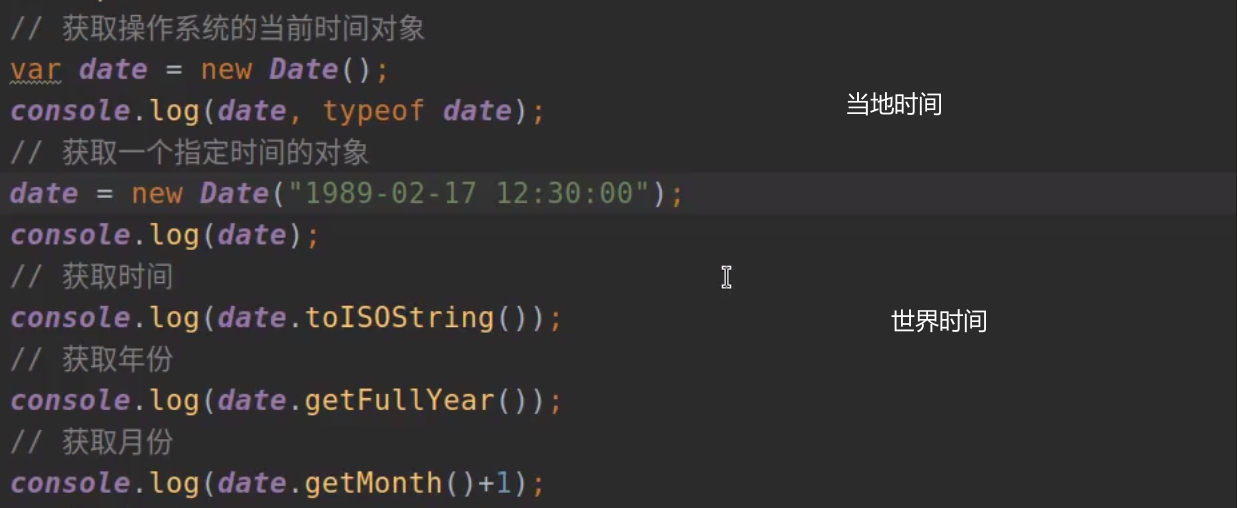
5.时间相关
判断语句/分支语句
1.if else 和 if else if else语句
2.switch case语句
判断语句:if else 和 if else if else
//if语句
/*
格式:if(条件){语句;
}else if(条件){语句;
}else{语句;
}*/
输入年龄进行范围判断
<body>
<input type="text" name="age"><input type="button" id="btn" value="提交">
<script>/*//判断语句1.if语句2.switch语句*///if语句//根据用户输入的年龄进行判断var btn = document.querySelector('#btn');btn.onclick = function () {let age = parseInt(document.querySelector('input[name="age"]').value);        //document.querySelectorAll()获取多个html标签if (age < 18) {console.log("未成年");} else if (age <= 35) {console.log("中年");} else {console.log("老年人");}}/*//出现的错误 :1.btn.onclick最开始写成:btn.onclick(判断语句),#onclick不是函数,而是事件处理属性(事件监听器属性),需要把一个函数(事件处理函数)赋值给onclick这样当元素被点击时就执行对应函数2.通过document.querySelector获取的是-->使用该选择器的标签而不是用户输入的值,且用户输入的是字符串未进行对其进行转换,否则导致一直是进行else语句块*/
</script>
</body>
判断语句:switch case
//switch语句
/*
意思:根据表达式的值匹配不同的case分支并执行相应的代码
格式:switch(表达式的值){case 比较的值:执行的语句;break;···default:执行的语句;}*/
根据今天周几进行更换背景颜色
//switch语句
/*
意思:根据表达式的值匹配不同的case分支并执行相应的代码
格式:switch(表达式的值){case 比较的值:执行的语句;break;···default:执行的语句;}*/
//根据今天周几进行更换背景颜色
var date = new Date();
var weekday = date.getDay();     //.getDay()获取今天是周几
switch (weekday) {case 0:console.log("7");break;case 1:console.log("1");break;case 2:console.log("2");break;case 3:console.log("3");break;case 4:console.log("4");break;case 5:console.log("5");break;default:console.log("6");
}
colorselect = ["red", "green", "yellow", "blue", "purple", "pink"];
document.body.style.backgroundColor = colorselect[weekday];
循环语句/遍历语句
1.while循环
2.for循环
循环语句:while
//while语句
/*
格式:
while(条件){语句;
}*/
//示例一:
var liList = ["guohan","gh","gg","hh"];
var num = 0;
while (num<liList.length){console.log(liList[num++]);/*console.log(liList[num]);num++;*/
}
//示例二:
var number = 1;
while(number<=10){console.log(number++);
}循环语句:for
//for循环
/*
//三种格式:
1.循环代替while:
for(变量初始化;判断条件;步进器){语句;
}
2.遍历数组成员的下标或对象属性
for(变量(成员下标)in 数组){语句;
}
3.遍历数组成员的值或对象属性的值
for(变量(成员的值) of 数组){语句;
}*/
for循环3种方法
//循环代替while
//示例一单个变量
for (let num=1;num<=10;num++){console.log(`num=${num}`);
}
//示例二多个变量
for (let num=1,number=10;num*3<=number;num++,number+=2){console.log(`num=${num},number=${number}`);
}//遍历数组成员下标
var obj = ["guohan","gh","gg","hh"];
for (let idx in obj){console.log(idx);
}//遍历数组成员
for (let index of obj){console.log(index);
}
补充:forEach(数组的内置方法): 遍历数组的每个元素并对每个元素进行一次指定的函数(回调函数)
//数组.forEach((当前元素,当前下标,原数组)=>{函数代码语句;});var obj = ["guohan","gh","gg","hh"];
obj.forEach((item,key)=>{console.log(item)}) //数组.forEach((当前元素,当前下标,原数组)=>{函数代码语句;});//里面是匿名函数新写法
//obj.forEach(item=>{console.log(item)});
异常处理和主动抛出异常
//异常处理
1.抛出内置异常
格式:
try{代码;
}catch(e){代码;     //如:console.log(`异常类型:${e.name},异常原因:${e.message}`);
}2.主动抛出自定义异常
//自定义异常用函数定义
function 自定义异常函数名(message){this.name = "(自定义的错误类型)";this.message = message || ”默认信息错误";     //后面是防止 throw时忘记传入错误信息参数
}
try {// 可能抛出异常的代码(包含 throw)if (条件不满足) {throw 自定义异常函数名(message); // 主动抛出异常}// 正常逻辑(如果没抛异常,会执行这里)
} catch (error) {// 捕获到异常后执行的处理逻辑console.error("捕获到异常:", error.message);
} finally {// 可选:无论是否抛出异常,都会执行的代码(如清理操作)console.log("操作结束");
}*/
抛出异常
//抛出内置异常
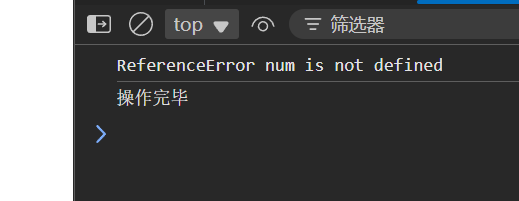
try{console.log(num);
}catch(e){console.log(e.name,e.message);      //e.name:异常类型   e.message:异常原因
}finally{console.log("操作完毕")
}//主动抛出自定义异常          throw
try {console.log(num);
} catch (e) {console.log(`异常类型=${e.name},异常原因=${e.message}`);        //异常类型=ReferenceError,异常原因=num is not defined
}//主动抛出自定义异常     throw
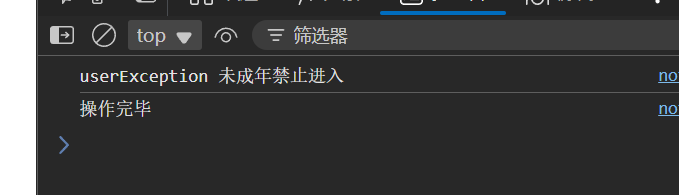
function UserError(message) {this.name = "userException";this.message = message || "默认错误信息";
}Person = {"name": "guohan", "age": 17};
try{if (Person.age < 18){throw new UserError("未成年禁止进入");}console.log("可以进入");
}catch(e){console.log(e.name,e.message);
}finally{console.log("操作完毕");
} 
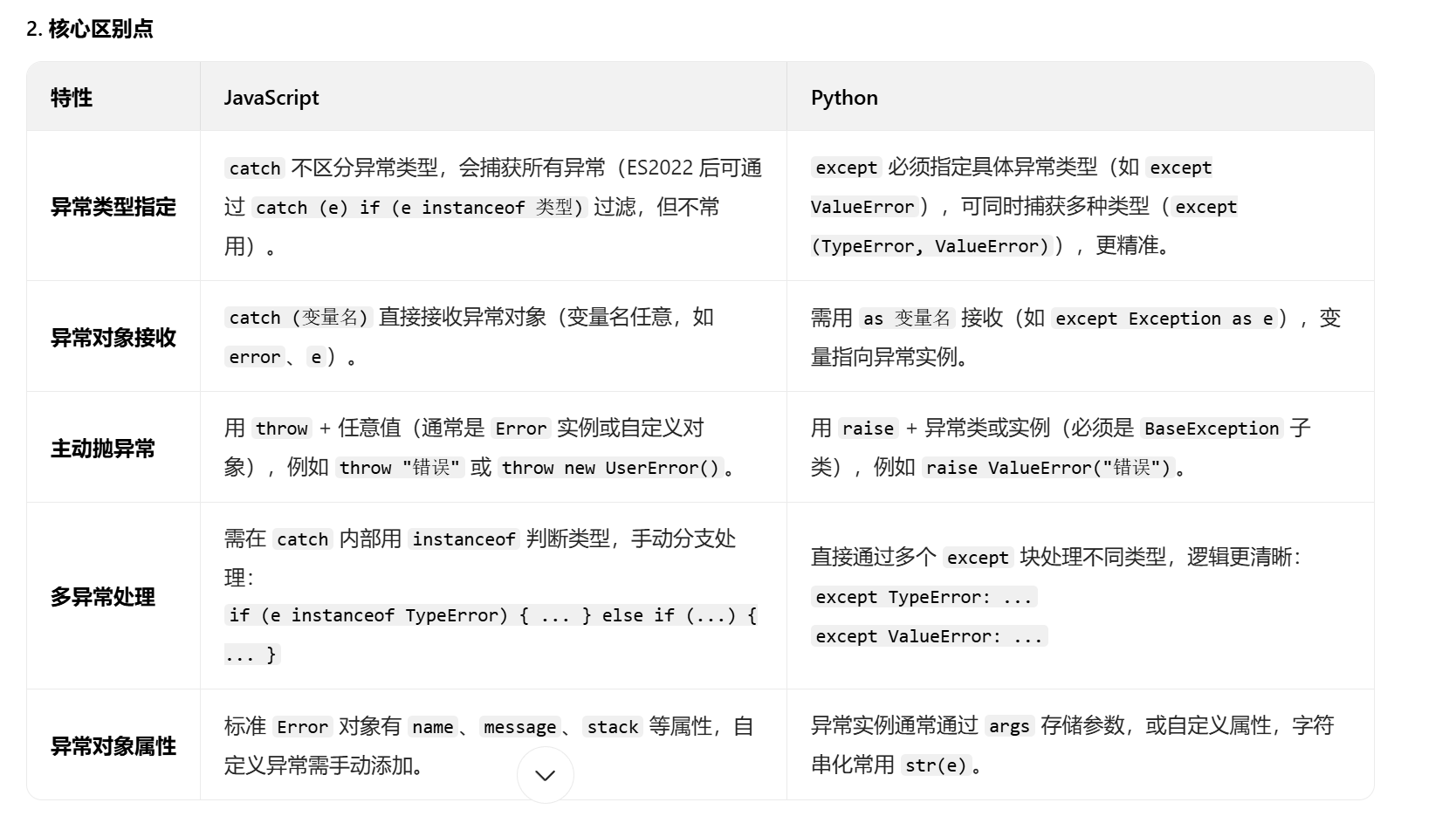
与python区别
时间相关