
Sciter之c++与前端交互(五)
入门介绍了前端调用c++能力,本章将介绍c++与html(前端)相互调用、数据传递等。
原文:https://lingkang.top/archives/sciter-f-a-cpp-call
前言
Sciter 是一个高质量但小众的嵌入式 UI 引擎,适合追求性能、体积和原生集成的桌面应用开发者。
我觉得 Sciter 比较有意思,它很小众,是闭源的,商用需要许可。它是Andrew Fedoniouk开发维护,Andrew获得了物理学和应用数学硕士学位以及艺术文凭。他的职业生涯始于俄罗斯航空航天工业的研究员。这种跨领域背景使他既具备深厚的技术功底,又懂得用户界面设计的艺术。
Sciter官网:https://sciter.com/2025-11-15 sciter-js-sdk最新版v6.0.2.28
本次入门开发环境:window 10 + Clion 2024.3 + Sciter-js v6.0.2.28(2025-11-15最新版) + Bundled MinGW 11.0
1.前端调用后端c++:将c++对象暴露给前端调用
基于入门(一):https://lingkang.top/archives/sciter-ru-men-zhi-hello-yi
下面将演示常见的两种方式:
- 第一种方式是常见的直接调用
c++暴露的方法 - 第二中方式暴露更灵活的
sciter::value相当于javascript中var,可以是number、string、json、arr、function等
c++
#include <cstdint> // C++ 标准头文件(首选)#include <windows.h>#include "sciter-x-window.hpp"#include "aux-cvt.h"#include "sciter-x.h"class myWindow : public sciter::window {public:myWindow() : window(SW_MAIN | SW_ENABLE_DEBUG) {}// 将c++的调用接口暴露给前端,前端调用时:Window.this.myWindow.nativeCallHello()SOM_PASSPORT_BEGIN(myWindow)SOM_FUNCS(SOM_FUNC(nativeCallHello))SOM_PASSPORT_END// 暴露名称,使用 xcall 调用 数据类型是 js的 sciter::valueBEGIN_FUNCTION_MAP// 0表示没有参数FUNCTION_0("byXcallReturnFun", byXcallReturnFun)// _1 是指有一个入参,入参相当于前端js的var对象,可能是number、string、arr、json、function等FUNCTION_1("byXcall", byXcall)END_FUNCTION_MAP// 暴露给前端js调用的方法sciter::string nativeCallHello() {MessageBoxW(NULL, L"hello,我是后端c++方法", L"确认", MB_OK);return WSTR("ok");}// sciter::value 可能是number、string、arr、json、function等sciter::value byXcall(sciter::value obj) {sciter::string data = obj.to_string();std::cout << "length=" << data.size() << std::endl;if (!data.empty()) {// 打印宽字符串std::wcout << L"前端入参 param = " << data << std::endl;return L"您的入参是: " + data;}// 例如返回一个jsonsciter::value json;json.set_item("code", 0);// 字符串含有中文时使用宽字符json.set_item("msg", L"error 您输入的值为空!");return json;}sciter::value byXcallReturnFun() {// 定义一个方法给前端调用std::function<std::wstring(const std::wstring)> myFun = [=](const std::wstring param) -> std::wstring {return L"听我说:" + param;};return sciter::value(myFun);}};int uimain(std::function<int()> run) {// 创建ui窗口实例sciter::om::hasset<myWindow> window = new myWindow();// 加载前端UI的html文件window->load(WSTR("file://C:\\Users\\Administrator\\Desktop\\project\\sciter\\app\\demo_20251121\\ui\\hello-ui.html"));window->expand();return run();}/*** 图形用户界面(GUI)应用程序的标准入口函数,相当于控制台程序中的 main 函数。* 2025-11-15 by lingkang*/int WINAPI WinMain(HINSTANCE hInstance, HINSTANCE hPrevInstance, LPSTR lpCmdLine, int nCmdShow) {// 启用试调SciterSetOption(NULL, SCITER_SET_SCRIPT_RUNTIME_FEATURES,ALLOW_FILE_IO |ALLOW_SOCKET_IO |ALLOW_EVAL |ALLOW_SYSINFO);// 初始化scitersciter::application::start();// 加载我们的窗口uimain([]() -> int { return sciter::application::run(); });// 结束时 关闭sciter::application::shutdown();return 0;}static std::vector<sciter::string> _argv;// 设置 sciter 的初始化应用namespace sciter {namespace application {HINSTANCE hinstance() {return nullptr; // not used}const std::vector<sciter::string> &argv() {// 获取命令行参数return _argv;}}}前端html
<!DOCTYPE html><htmlwindow-width=600pxwindow-height=450pxwindow-resizable=true><head><meta charset="UTF-8"><title>lingkang的sciter前端与c++相互调用演示</title><style>.flex-row {display: flex;flex-direction: row;gap: 10px;}</style></head><body style="display: flex;flex-direction: column;gap: 20px"><button type="button" id="btn">点击调用c++能力(Window.this.myWindow.nativeCallHello())</button><div class="flex-row"><input type="text" placeholder="请输入入参" id="xcallValue"></input><button type="button" id="btn-xcall">基于xcall调用</button></div><button type="button" id="btn-xcall-fun">基于xcall调用返回方法</button><script>// 给按钮绑定点击事件document.getElementById('btn').onclick = function () {// 一定要用 Window.this.c++定义的类名.要调用的方法名称const result = Window.this.myWindow.nativeCallHello()console.log('result=' + result)}// 基于 xcall 调用document.getElementById('btn-xcall').onclick = async function () {var val = document.getElementById('xcallValue').valuevar result = Window.this.xcall('byXcall', val)if (typeof result === 'object') {// 返回对象时console.log(JSON.stringify(result))} else {console.log(result)}}// 基于xcall调用返回方法document.getElementById('btn-xcall-fun').onclick = function () {var fun = Window.this.xcall('byXcallReturnFun')var res = fun('lingkang,你好')// 调用方法console.log(res)}</script></body></html>效果
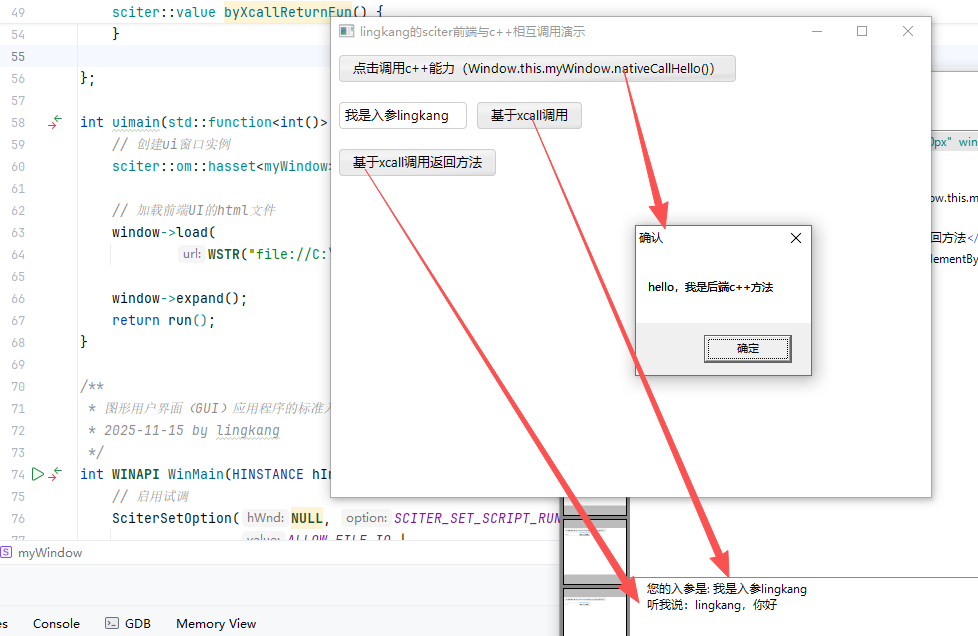
后端调用前端:
下面将演示:
c++操作domc++执行js到前端javascript环境
c++
#include <cstdint> // C++ 标准头文件(首选)#include <windows.h>#include <thread>#include "sciter-x-window.hpp"#include "aux-cvt.h"#include "sciter-x.h"#include "sciter-x-dom.h"#include "sciter-x-threads.h"class myWindow : public sciter::window {public:myWindow() : window(SW_MAIN | SW_ENABLE_DEBUG) {}// 将c++的调用接口暴露给前端,前端调用时:Window.this.myWindow.方法名()SOM_PASSPORT_BEGIN(myWindow)SOM_FUNCS(SOM_FUNC(cppGetHtml),SOM_FUNC(theadUpdateDom),SOM_FUNC(callJavaScriptFun),SOM_FUNC(executeJs))SOM_PASSPORT_END// dom 操作sciter::astring cppGetHtml() {sciter::dom::element document = root();sciter::astring htmlContent = document.get_html();std::cout << "获取前端的html代码" << htmlContent.c_str() << std::endl;return htmlContent;}void theadUpdateDom() {// 启动后台线程sciter::thread([](myWindow *win) {for (int i = 0; i < 5; ++i) {std::cout << "Thread running: " << i << std::endl;sciter::dom::element document = win->root();HELEMENT id = document.get_element_by_id("id-h2");const BYTE *html;std::string html_content = "c++线程执行次数:" + std::to_string(i);html = reinterpret_cast<const BYTE *>(html_content.c_str());// 操作dom设置内容,主线程才能更新GUI,此方法会在主线程中执行SciterSetElementHtml(id, html, html_content.length() + 1, 0);// 模拟间隔,休眠2秒std::this_thread::sleep_for(std::chrono::milliseconds(2000));}}, this);}// 调用html中定义的js方法void callJavaScriptFun() {// 入参,只有一个VALUE argvs[1];LPCWSTR chars = L"入参字符串:lingkang";ValueStringDataSet(&argvs[0], chars, wcslen(chars), 0);VALUE result;// 调用前端js定义的 my_js_fun 方法SCDOM_RESULT ok = SciterCallScriptingFunction(root(), "my_js_fun", argvs, 1, &result);if (ok == SCDOM_OK) {// 获取字符串数据std::cout << "调用js的结果: " << VALUE_to_string(result) << std::endl;} else {// 处理错误std::cout << "调用js出错啦 " << std::endl;}// 清理ValueClear(&result);ValueClear(&argvs[0]);}/*** 转为字符串*/std::string VALUE_to_string(VALUE val) {LPCWSTR str_data;UINT str_length;ValueStringData(&val, &str_data, &str_length);std::string utf8_str;if (str_data && str_length > 0) {// 宽字符转换为UTF-8int utf8_length = WideCharToMultiByte(CP_UTF8, 0, str_data, str_length, nullptr, 0, NULL, NULL);utf8_str.resize(utf8_length);WideCharToMultiByte(CP_UTF8, 0, str_data, str_length, &utf8_str[0], utf8_length, NULL, NULL);}return utf8_str;}void executeJs(sciter::string js) {LPCWSTR myJs = js.c_str();// L"console.log('我是c++的js')";VALUE result;// 执行jsSciterEvalElementScript(root(), myJs, wcslen(myJs), &result);std::cout << "执行js的结果: " << VALUE_to_string(result) << std::endl;ValueClear(&result);}};int uimain(std::function<int()> run) {// 创建ui窗口实例sciter::om::hasset<myWindow> window = new myWindow();// 加载前端UI的html文件window->load(WSTR("file://C:\\Users\\Administrator\\Desktop\\project\\sciter\\app\\demo_20251121\\ui\\hello-ui_cpp.html"));window->expand();return run();}/*** 图形用户界面(GUI)应用程序的标准入口函数,相当于控制台程序中的 main 函数。* 2025-11-15 by lingkang*/int WINAPI WinMain(HINSTANCE hInstance, HINSTANCE hPrevInstance, LPSTR lpCmdLine, int nCmdShow) {// 启用试调SciterSetOption(NULL, SCITER_SET_SCRIPT_RUNTIME_FEATURES,ALLOW_FILE_IO |ALLOW_SOCKET_IO |ALLOW_EVAL |ALLOW_SYSINFO);// 初始化scitersciter::application::start();// 加载我们的窗口uimain([]() -> int { return sciter::application::run(); });// 结束时 关闭sciter::application::shutdown();return 0;}static std::vector<sciter::string> _argv;// 设置 sciter 的初始化应用namespace sciter {namespace application {HINSTANCE hinstance() {return nullptr; // not used}const std::vector<sciter::string> &argv() {// 获取命令行参数return _argv;}}}html
<!DOCTYPE html><htmlwindow-width=600pxwindow-height=450pxwindow-resizable=true><head><meta charset="UTF-8"><title>lingkang的sciter前端与c++相互调用演示</title><style>.flex-row {display: flex;flex-direction: row;gap: 10px;}</style></head><body style="display: flex;flex-direction: column;gap: 20px"><h1>c++调用前端</h1><h2 id="id-h2"></h2><button id="btn-getHtml">c++获取html代码</button><button id="btn-cpp-thread">c++线程操作dom</button><button id="btn-cpp-callJsFun">c++调用js的方法</button><div><textarea id="exJs">console.log('我是c++的js');// 删除当前页面 ~document.body.remove();function aa(){return '结果666';}// call 返回一个值给c++,放到最后执行的方法有返回值就行aa();</textarea><button id="btn-exJx">c++执行js脚本</button></div><script>// 给按钮绑定点击事件document.getElementById('btn-getHtml').onclick = function () {const html = Window.this.myWindow.cppGetHtml()console.log(html)}document.getElementById('btn-cpp-thread').onclick = function () {// 启动线程更新 <h2 id="id-h2"></h2>Window.this.myWindow.theadUpdateDom()}document.getElementById('btn-cpp-callJsFun').onclick = function () {Window.this.myWindow.callJavaScriptFun()}// 定义一个js方法给c++调用function my_js_fun(param) {console.log('js方法被调用' + param);return '你的入参是:' + param}document.getElementById('btn-exJx').onclick = function () {const js = document.getElementById('exJs').valueconsole.log('c++要执行的js:\n'+js)Window.this.myWindow.executeJs(js)}</script></body></html>结果截图
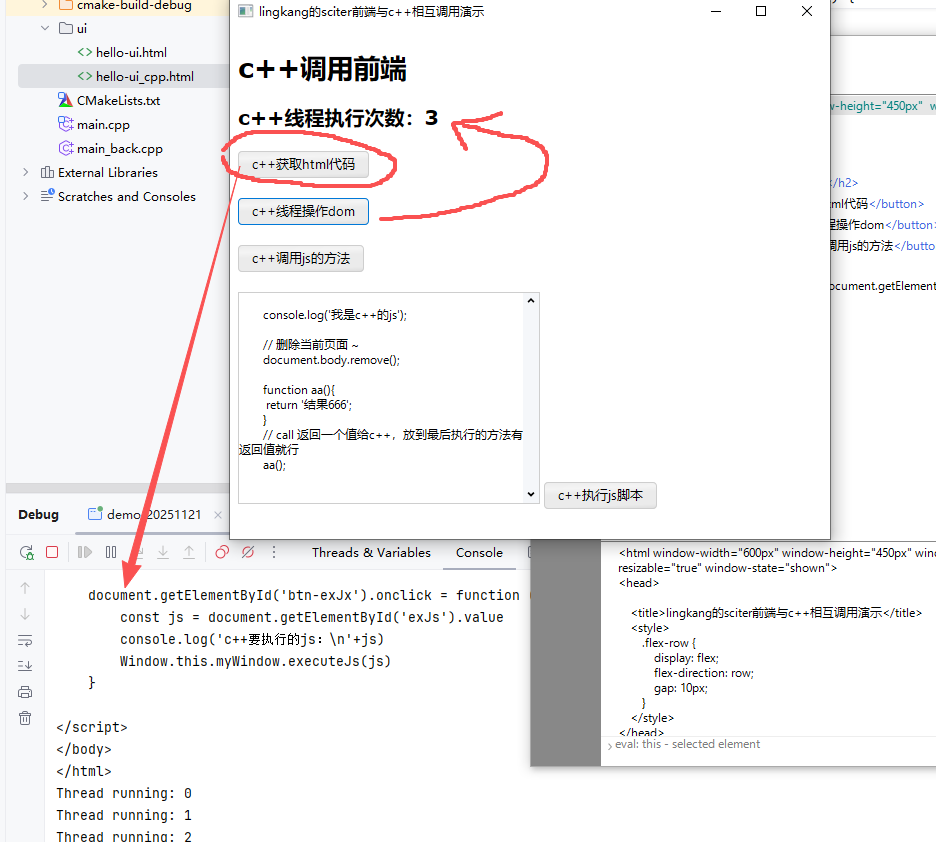
点击 c++调用js的方法

篇幅有限,下一篇将介绍 c++ 与前端的状态、事件监听与交互