
开发应用沉浸式效果
概述
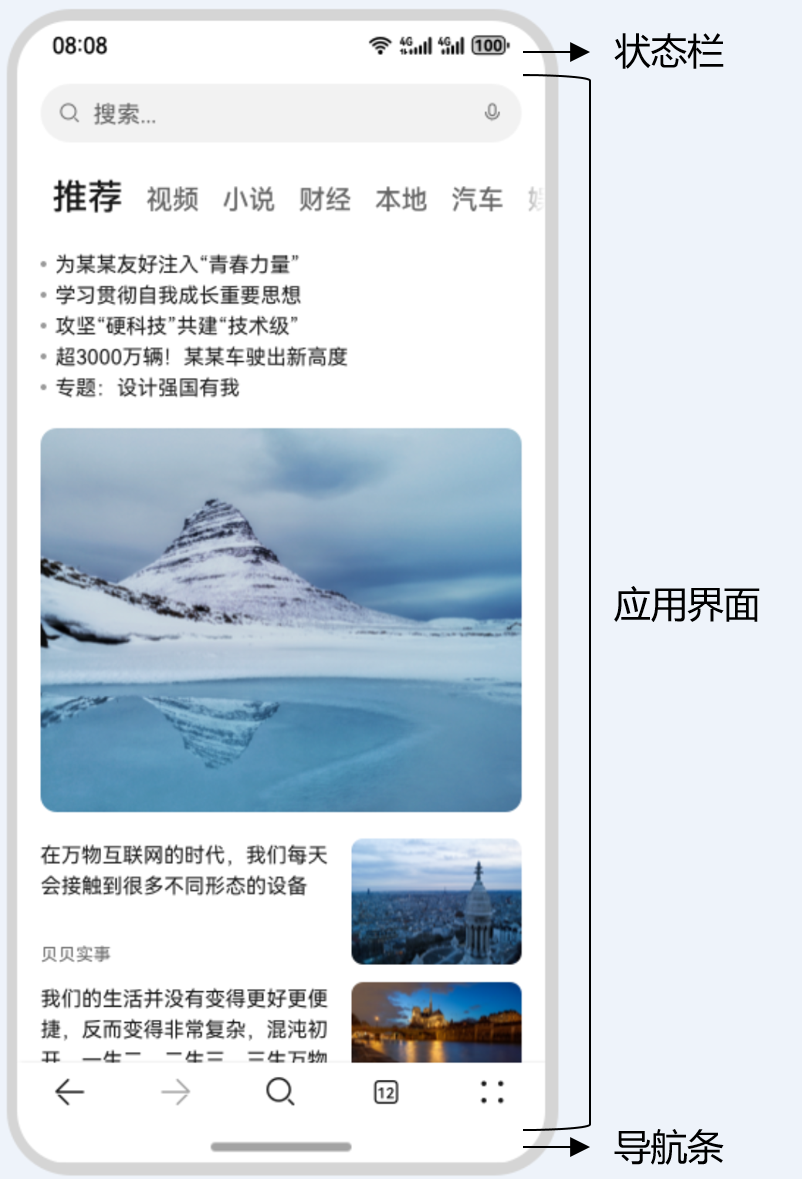
典型应用全屏窗口UI元素包括状态栏、应用界面和底部导航条,其中状态栏和导航条,通常在沉浸式布局下称为避让区;避让区之外的区域称为安全区。开发应用沉浸式效果主要指通过调整状态栏、应用界面和导航条的显示效果来减少状态栏导航条等系统界面的突兀感,从而使用户获得最佳的UI体验。
图1 界面元素示意图
沉浸式页面开发通常分为以下两步:
-
实现沉浸式效果。
- 方案一:使用Window.setWindowLayoutFullScreen()方法设置窗口为全屏模式。
隐藏状态栏
避让状态栏
- 方案二:设置组件的expandSafeArea属性,扩展组件的安全区域到状态栏和导航栏,从而实现沉浸式。
-
处理避让区域和页面内容的适配问题。
由于避让区本身是有内容展示,如状态栏中的电量、时间等系统信息,或是手势交互,如导航条点击或上滑,在实现应用页面沉浸式效果后,往往会和避让区域产生UI元素的遮挡、视觉上的违和或交互上的冲突等问题,开发者可以针对不同场景选择以下方式对避让区和应用页面进行适配。
- 使用Window.setWindowSystemBarEnable()方法或Window.setSpecificSystemBarEnabled()方法设置状态栏和导航栏的显隐。
- 使用Window.setWindowSystemBarProperties()方法设置状态栏和导航栏的样式。
- 使用Window.getWindowAvoidArea()方法获取避让区域的高度,据此设置应用页面内容的上下padding实现避让状态栏和导航栏。
- 使用Display.getCutoutInfo()方法获取挖孔区域宽高和位置信息,设置对应避让元素的margin实现挖孔区避让。
@Entry
@Component
struct Index {build() {Column() {Row() {Text('ROW1').fontSize(40)}.backgroundColor(Color.Orange).padding(20)Row() {Text('ROW2').fontSize(40)}.backgroundColor(Color.Orange).padding(20)Row() {Text('ROW3').fontSize(40)}.backgroundColor(Color.Orange).padding(20)Row() {Text('ROW4').fontSize(40)}.backgroundColor(Color.Orange).padding(20)Row() {Text('ROW5').fontSize(40)}.backgroundColor(Color.Orange).padding(20)Row() {Text('ROW6').fontSize(40)}.backgroundColor(Color.Orange).padding(20)}.width('100%').height('100%').alignItems(HorizontalAlign.Center).justifyContent(FlexAlign.SpaceBetween).backgroundColor('#008000')}
}
窗口全屏布局方案
1.调用setWindowLayoutFullScreen()接口设置窗口全屏
2.使用getWindowAvoidArea()接口获取当前布局遮挡区域(例如状态栏、导航条)。
3.注册监听函数,动态获取避让区域的实时数据。常见的触发避让区回调的场景如下:应用窗口在全屏模式、悬浮模式、分屏模式之间的切换;应用窗口旋转;多折叠设备在屏幕折叠态和展开态之间的切换;应用窗口在多设备之间的流转。
export default class EntryAbility extends UIAbility {onCreate(want: Want, launchParam: AbilityConstant.LaunchParam): void {this.context.getApplicationContext().setColorMode(ConfigurationConstant.ColorMode.COLOR_MODE_NOT_SET);hilog.info(0x0000, 'testTag', '%{public}s', 'Ability onCreate');}onDestroy(): void {hilog.info(0x0000, 'testTag', '%{public}s', 'Ability onDestroy');}onWindowStageCreate(windowStage: window.WindowStage): void {// Main window is created, set main page for this abilityhilog.info(0x0000, 'testTag', '%{public}s', 'Ability onWindowStageCreate');// ....// ....// ....// ✅✅✅✅✅// 获取应用主窗口const windowClass: window.Window = windowStage.getMainWindowSync();// 窗口全屏布局方案windowClass.setWindowLayoutFullScreen(true)// 方案1:// windowClass.setSpecificSystemBarEnabled('status', false)// windowClass.setSpecificSystemBarEnabled('navigationIndicator', false)// 方案2// 获取布局避让遮挡的区域const topRectHeight = windowClass.getWindowAvoidArea(window.AvoidAreaType.TYPE_SYSTEM).topRect.height; // 状态栏区域高度AppStorage.setOrCreate('topRectHeight', topRectHeight);const bottomRectHeight = windowClass.getWindowAvoidArea(window.AvoidAreaType.TYPE_NAVIGATION_INDICATOR).bottomRect.height; // 导航条区域的高度AppStorage.setOrCreate('bottomRectHeight', bottomRectHeight);// 注册监听函数,动态获取避让区域数据windowClass.on('avoidAreaChange', (data) => {if (data.type === window.AvoidAreaType.TYPE_SYSTEM) {AppStorage.setOrCreate('topRectHeight', data.area.topRect.height);} else if (data.type == window.AvoidAreaType.TYPE_NAVIGATION_INDICATOR) {AppStorage.setOrCreate('bottomRectHeight', data.area.bottomRect.height);}});// ....// ....
4.布局中的UI元素需要避让状态栏和导航条,对控件顶部设置padding(具体数值与状态栏高度一致),实现对状态栏的避让;对底部设置padding(具体数值与底部导航条区域高度一致),实现对底部导航条的避让。
@Entry
@Component
struct Test2 {@StorageProp('bottomRectHeight')  bottomRectHeight: number = 0;@StorageProp('topRectHeight')  topRectHeight: number = 0;build() {Column() {Row() {Text('ROW1').fontSize(40)}.backgroundColor(Color.Orange).padding(20)Row() {Text('ROW2').fontSize(40)}.backgroundColor(Color.Orange).padding(20)Row() {Text('ROW3').fontSize(40)}.backgroundColor(Color.Orange).padding(20)Row() {Text('ROW4').fontSize(40)}.backgroundColor(Color.Orange).padding(20)Row() {Text('ROW5').fontSize(40)}.backgroundColor(Color.Orange).padding(20)Row() {Text('ROW6').fontSize(40)}.backgroundColor(Color.Orange).padding(20)}.width('100%').height('100%').alignItems(HorizontalAlign.Center).justifyContent(FlexAlign.SpaceBetween).backgroundColor('#008000')// top数值与状态栏区域高度保持一致;bottom数值与导航条区域高度保持一致.padding({ top: px2vp(this.topRectHeight), bottom: px2vp(this.bottomRectHeight) })}
}
- 也可以单独组建设置全屏
import { window } from '@kit.ArkUI'@Entry
@Component
struct Test2 {async aboutToAppear() {const win = await window.getLastWindow(getContext())win.setWindowLayoutFullScreen(true)}build() {Column() {Row() {Text('ROW1').fontSize(40)}.backgroundColor(Color.Orange).padding(20)Row() {Text('ROW2').fontSize(40)}.backgroundColor(Color.Orange).padding(20)Row() {Text('ROW3').fontSize(40)}.backgroundColor(Color.Orange).padding(20)Row() {Text('ROW4').fontSize(40)}.backgroundColor(Color.Orange).padding(20)Row() {Text('ROW5').fontSize(40)}.backgroundColor(Color.Orange).padding(20)Row() {Text('ROW6').fontSize(40)}.backgroundColor(Color.Orange).padding(20)}.width('100%').height('100%').alignItems(HorizontalAlign.Center).justifyContent(FlexAlign.SpaceBetween).backgroundColor('#008000')}
}
组件安全区方案
@Entry
@Component
struct Test2 {build() {Column() {Row() {Text('ROW1').fontSize(40)}.backgroundColor(Color.Orange).padding(20)Row() {Text('ROW2').fontSize(40)}.backgroundColor(Color.Orange).padding(20)Row() {Text('ROW3').fontSize(40)}.backgroundColor(Color.Orange).padding(20)Row() {Text('ROW4').fontSize(40)}.backgroundColor(Color.Orange).padding(20)Row() {Text('ROW5').fontSize(40)}.backgroundColor(Color.Orange).padding(20)Row() {Text('ROW6').fontSize(40)}.backgroundColor(Color.Orange).padding(20)}.width('100%').height('100%').alignItems(HorizontalAlign.Center).justifyContent(FlexAlign.SpaceBetween).backgroundColor('#008000').expandSafeArea([SafeAreaType.SYSTEM], [SafeAreaEdge.TOP, SafeAreaEdge.BOTTOM])}
}
键盘避让
压缩、上抬
https://developer.huawei.com/consumer/cn/doc/harmonyos-references/ts-universal-attributes-expand-safe-area#示例6切换避让模式
import { hilog } from '@kit.PerformanceAnalysisKit';
import { KeyboardAvoidMode } from '@kit.ArkUI';
@Entry
@Componentstruct KeyboardAvoidExample3 {build() {Column() {Row({space:15}) {Button('OFFSET').onClick(() => {this.getUIContext().setKeyboardAvoidMode(KeyboardAvoidMode.OFFSET);hilog.info(0x0000, 'keyboardAvoidMode: %{public}s', JSON.stringify(this.getUIContext().getKeyboardAvoidMode()));}).layoutWeight(1)Button('RESIZE').onClick(() => {this.getUIContext().setKeyboardAvoidMode(KeyboardAvoidMode.RESIZE);hilog.info(0x0000, 'keyboardAvoidMode: %{public}s', JSON.stringify(this.getUIContext().getKeyboardAvoidMode()));}).layoutWeight(1)Button('NONE').onClick(() => {this.getUIContext().setKeyboardAvoidMode(KeyboardAvoidMode.NONE);hilog.info(0x0000, 'keyboardAvoidMode: %{public}s', JSON.stringify(this.getUIContext().getKeyboardAvoidMode()));}).layoutWeight(1)}.height("30%").width("100%").backgroundColor(Color.Gray)TextArea().width("100%").borderWidth(1)Text("I can see the bottom of the page").width("100%").textAlign(TextAlign.Center).backgroundColor('rgb(179,217,235)').layoutWeight(1)TextArea().width("100%").borderWidth(1)}.width('100%').height("100%")}
}
鸿蒙开发者班级