FlipPanel2类是负责控制逻辑。
FlipPanel2.cs
using Avalonia;
using Avalonia.Animation.Easings;
using Avalonia.Controls;
using Avalonia.Controls.Metadata;
using Avalonia.Controls.Primitives;
using System;namespace AvaloniaUI
{[TemplatePart("PART_FrontHost", typeof(Border))][TemplatePart("PART_BackHost", typeof(Border))][TemplatePart("PART_FlipButton", typeof(ToggleButton))]public class FlipPanel2 : TemplatedControl{// ========== 依赖属性 ==========public static readonly StyledProperty<Control?> FrontContentProperty =AvaloniaProperty.Register<FlipPanel2, Control?>(nameof(FrontContent));public static readonly StyledProperty<Control?> BackContentProperty =AvaloniaProperty.Register<FlipPanel2, Control?>(nameof(BackContent));public static readonly StyledProperty<bool> IsFlippedProperty =AvaloniaProperty.Register<FlipPanel2, bool>(nameof(IsFlipped));public static readonly StyledProperty<double> FlipAngleProperty =AvaloniaProperty.Register<FlipPanel2, double>(nameof(FlipAngle), 0d);// ========== CLR 包装 ==========public Control? FrontContent{get => GetValue(FrontContentProperty);set => SetValue(FrontContentProperty, value);}public Control? BackContent{get => GetValue(BackContentProperty);set => SetValue(BackContentProperty, value);}public bool IsFlipped{get => GetValue(IsFlippedProperty);set => SetValue(IsFlippedProperty, value);}public double FlipAngle{get => GetValue(FlipAngleProperty);set => SetValue(FlipAngleProperty, value);}// ========== 模板部件 ==========private ToggleButton? flipButton;public FlipPanel2(){// 监听属性变化this.GetObservable(IsFlippedProperty).Subscribe(_ =>{UpdatePseudoClasses();});}protected override void OnApplyTemplate(TemplateAppliedEventArgs e){base.OnApplyTemplate(e);flipButton = e.NameScope.Find<ToggleButton>("PART_FlipButton");if (flipButton != null)flipButton.Click += (_, _) => ToggleFlipped();UpdatePseudoClasses();}private void ToggleFlipped(){IsFlipped = !IsFlipped;}private void UpdatePseudoClasses(){PseudoClasses.Set(":flipped", IsFlipped);}}
}
测试的Style.axaml
<Styles xmlns="https://github.com/avaloniaui"xmlns:x="http://schemas.microsoft.com/winfx/2006/xaml"xmlns:local="using:AvaloniaUI"><Design.PreviewWith></Design.PreviewWith><Style Selector="local|FlipPanel2"><!-- 默认角度 --><Setter Property="local:FlipPanel2.FlipAngle" Value="0"/><Setter Property="Template"><Setter.Value><ControlTemplate><Grid RowDefinitions="*, auto"><!-- Front content --><Border x:Name="PART_FrontHost"BorderBrush="{TemplateBinding BorderBrush}"BorderThickness="{TemplateBinding BorderThickness}"CornerRadius="{TemplateBinding CornerRadius}"Background="#E0F7FA"Opacity="1"><ContentPresenter Content="{TemplateBinding FrontContent}"HorizontalAlignment="Center"VerticalAlignment="Center"/><Border.Transitions><Transitions><DoubleTransition Property="Opacity"Duration="0:0:0.3"Easing="SineEaseInOut"/></Transitions></Border.Transitions></Border><!-- Back content --><Border x:Name="PART_BackHost"BorderBrush="{TemplateBinding BorderBrush}"BorderThickness="{TemplateBinding BorderThickness}"CornerRadius="{TemplateBinding CornerRadius}"Background="#FFF3E0"Opacity="0"><ContentPresenter Content="{TemplateBinding BackContent}"HorizontalAlignment="Center"VerticalAlignment="Center"/><Border.Transitions><Transitions><DoubleTransition Property="Opacity"Duration="0:0:0.3"Easing="SineEaseInOut"/></Transitions></Border.Transitions></Border><!-- Flip button --><ToggleButton x:Name="PART_FlipButton"Grid.Row="1"Width="20" Height="20"Margin="0,5,0,5"HorizontalAlignment="Center"VerticalAlignment="Center"><ToggleButton.Template><ControlTemplate><Grid><Ellipse Stroke="#555" Fill="WhiteSmoke" StrokeThickness="0.5"/><Path Data="M4,5 L7,6.5 L4,8 Z" Margin="2,0,0,0"Fill="#455A64"Height="15"Stretch="Uniform"HorizontalAlignment="Center"VerticalAlignment="Center"/></Grid></ControlTemplate></ToggleButton.Template><ToggleButton.RenderTransform><Rotate3DTransform AngleY="{Binding FlipAngle, RelativeSource={RelativeSource TemplatedParent}}"><Rotate3DTransform.Transitions><Transitions><DoubleTransition Property="AngleY"Duration="0:0:0.3"Easing="SineEaseInOut"/></Transitions></Rotate3DTransform.Transitions></Rotate3DTransform></ToggleButton.RenderTransform></ToggleButton></Grid></ControlTemplate></Setter.Value></Setter><!-- flipped 状态样式 --><Style Selector="^:flipped /template/ Border#PART_FrontHost"><Setter Property="Opacity" Value="0"/><Setter Property="IsHitTestVisible" Value="False"/></Style><Style Selector="^:flipped /template/ Border#PART_BackHost"><Setter Property="Opacity" Value="1"/><Setter Property="IsHitTestVisible" Value="True"/></Style><Style Selector="^:not(:flipped) /template/ Border#PART_FrontHost"><Setter Property="IsHitTestVisible" Value="True"/></Style><Style Selector="^:not(:flipped) /template/ Border#PART_BackHost"><Setter Property="IsHitTestVisible" Value="False"/></Style><!-- 旋转角度 --><Style Selector="^:flipped"x:SetterTargetType="local:FlipPanel2"><Setter Property="local:FlipPanel2.FlipAngle" Value="180"/></Style></Style>
</Styles>
FlipPanelTest.axaml代码
<Window xmlns="https://github.com/avaloniaui"xmlns:x="http://schemas.microsoft.com/winfx/2006/xaml"xmlns:d="http://schemas.microsoft.com/expression/blend/2008"xmlns:mc="http://schemas.openxmlformats.org/markup-compatibility/2006"xmlns:local="using:AvaloniaUI"Height="300" Width="300"x:Class="AvaloniaUI.FlipPanelTest"Title="FlipPanelTest"><Grid Background="Transparent"><local:FlipPanel2 x:Name="panel"BorderBrush="DarkOrange"BorderThickness="3"IsFlipped="True"CornerRadius="4"Margin="10"><!-- Front content --><local:FlipPanel2.FrontContent><StackPanel Margin="6"><StackPanel.Styles><Style Selector="Button"><Setter Property="HorizontalAlignment" Value="Center"/><Setter Property="Padding" Value="3"/><Setter Property="Margin" Value="3"/></Style></StackPanel.Styles><TextBlock Text="This is the front side of the FlipPanel."TextWrapping="Wrap"Margin="3"FontSize="16"Foreground="DarkOrange"/><Button Content="Button One"/><Button Content="Button Two"/><Button Content="Button Three"/><Button Content="Button Four"/></StackPanel></local:FlipPanel2.FrontContent><!-- Back content --><local:FlipPanel2.BackContent><Grid Margin="6" RowDefinitions="auto,*"><TextBlock Text="This is the back side of the FlipPanel."TextWrapping="Wrap"Margin="3"FontSize="16"Foreground="DarkMagenta"/><Button Grid.Row="1"Margin="3"Padding="10"Content="Flip Back to Front"HorizontalAlignment="Center"VerticalAlignment="Center"Click="cmdFlip_Click"/></Grid></local:FlipPanel2.BackContent></local:FlipPanel2></Grid>
</Window>
FlipPanelTest.cs代码
using Avalonia;
using Avalonia.Controls;
using Avalonia.Interactivity;
using Shares.Avalonia;namespace AvaloniaUI;public partial class FlipPanelTest : Window
{public FlipPanelTest(){InitializeComponent();this.Load("avares://AvaloniaUI/Demos/Book/18/CustomControls/FlipPanel.axaml");}private void cmdFlip_Click(object? sender, RoutedEventArgs e){// 切换翻转状态panel.IsFlipped = !panel.IsFlipped;}
}
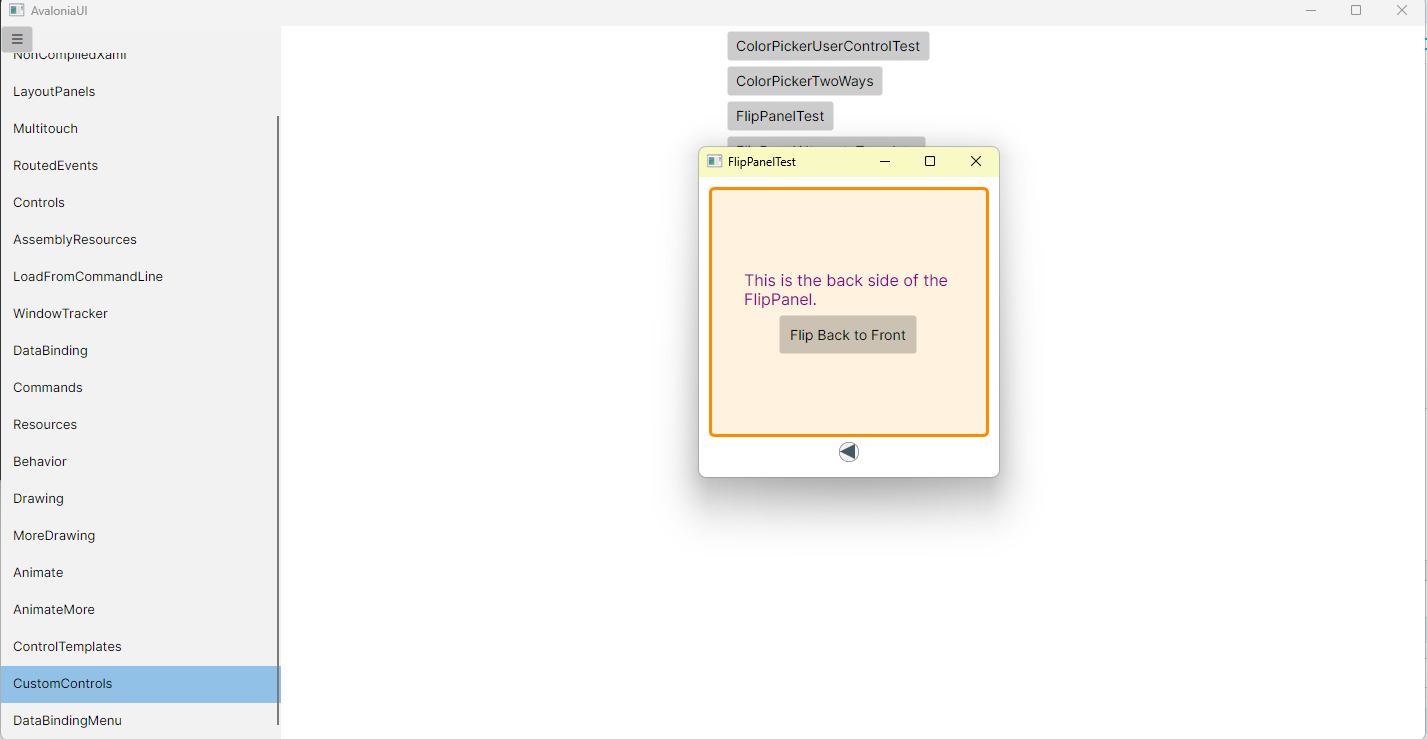
运行效果