拓冰网站定制
周五临近下班,原本打算摸摸鱼,结果产品经理来个新需求。领导觉得 AI 服务器报价太贵,想先做个“低成本替代方案”来演示一下分析效果。于是,需求会议就开了。其中有一块功能是 “检索内容高亮显示并展示匹配度”,产品经理说这可以考虑用 Elasticsearch 实现。行吧,需求是他提的,代码自然就得咱来写了。那就开干吧 💪
一、启动 Elasticsearch 服务(Docker 简单搞定)
这里用的是 Elasticsearch 8.xx,主要是考虑我们项目还在用 JDK 8。
1. docker
docker run \-d \--privileged=true \--name elasticsearch \-p 9200:9200 \-p 9300:9300 \-e "ES_JAVA_OPTS=-Xms1024m -Xmx2048m" \-e "discovery.type=single-node" \-e "ELASTIC_PASSWORD=elastic" \-e "xpack.security.enabled=true" \-e TZ=Asia/Shanghai \-v /etc/localtime:/etc/localtime:ro \-v /home/bugshare/elasticsearch/config/elasticsearch.yml:/usr/share/elasticsearch/config/elasticsearch.yml:ro \-v /home/bugshare/elasticsearch/data:/usr/share/elasticsearch/data \-v /home/bugshare/elasticsearch/plugins:/usr/share/elasticsearch/plugins \elasticsearch:8.19.6
2. 配置文件
# elasticsearch.yml
cluster.name: "docker-cluster"
network.host: 0.0.0.0http.cors.enabled: true
http.cors.allow-origin: "*"http.cors.allow-headers: Authorization
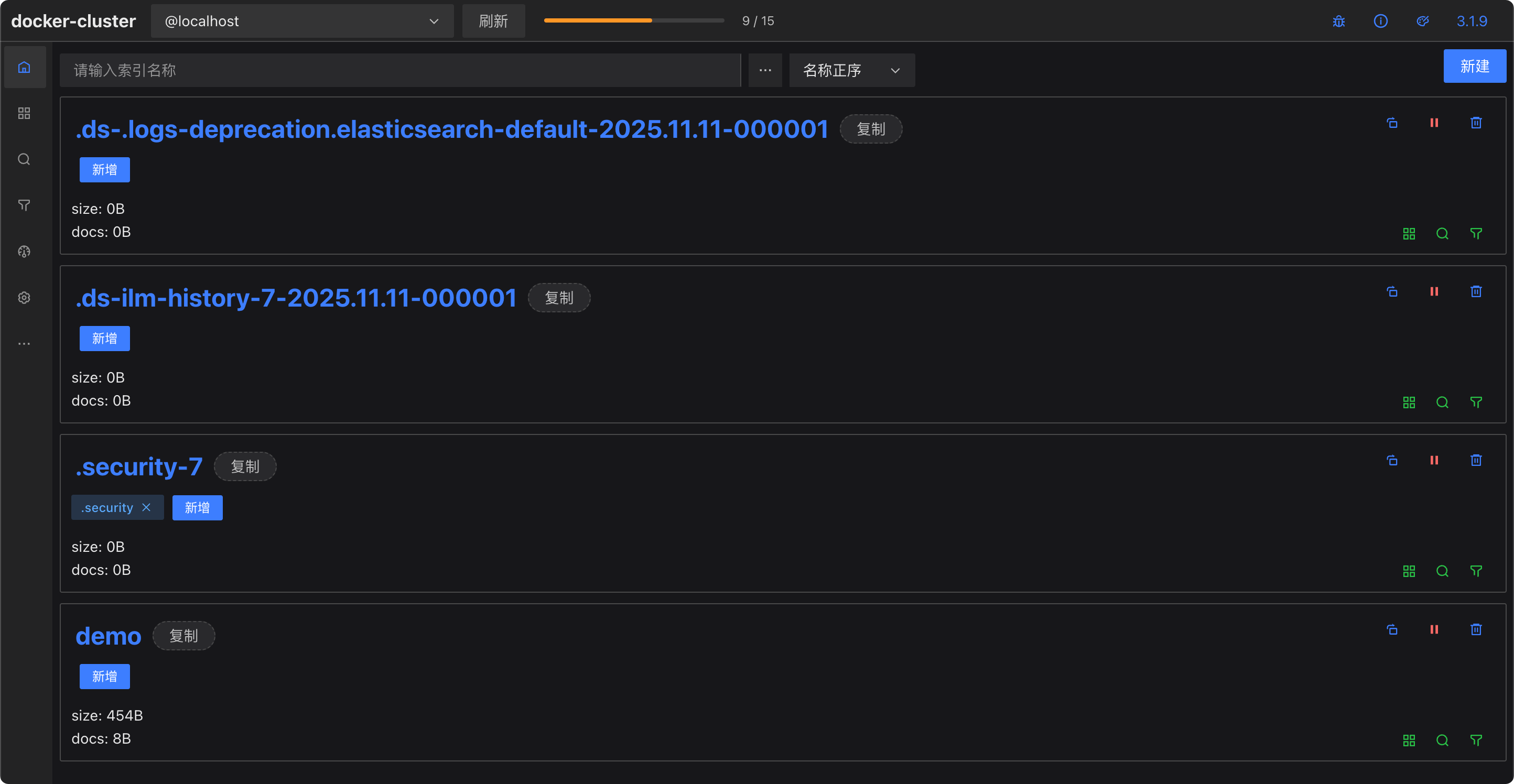
验证下是否启动成功:浏览器访问 http://127.0.0.1:9200,用户名密码:elastic / elastic,推荐装个浏览器插件 es-client 来操作更方便。
二、Java 集成 Elasticsearch
官方提供的 Java API 用起来有点繁琐,于是我去找了两个现成的封装框架:
- Easy-ES
- BBoss-Elasticsearch
下面是我整理的一份对比(AI 协助分析 👇):
详细对比表格
| 维度 | Easy-ES | BBoss-Elasticsearch |
|---|---|---|
| 核心定位 | 极简 ORM,对标 MyBatis-Plus | 企业级 ES 客户端 & 数据同步框架 |
| 设计理念 | 用对象操作 ES,屏蔽复杂性 | 简化但不屏蔽,保留灵活控制 |
| 学习曲线 | 非常平缓(MyBatis-Plus 用户零上手成本) | 中等,需要理解 DSL 构建 |
| 查询 DSL | 自动生成 | 可手写,灵活度高 |
| ORM 支持 | 强 | 基础支持 |
| 数据同步 | 无 | 内置高性能数据同步 |
| 代码侵入性 | 较高(依赖注解) | 较低(注解可选) |
| 性能 | 简单查询快,复杂查询略逊 | 高性能,生产验证完善 |
| 文档 & 社区 | 中文文档完善 | 文档详尽,维护积极 |
| 适用场景 | 快速原型、轻量搜索 | 企业级复杂查询、数据同步 |
我个人更偏爱能写 DSL 的方案,于是选择了 BBoss。
三、Spring Boot 整合 BBoss
1. 引入依赖
// build.gradle
implementation 'com.bbossgroups.plugins:bboss-elasticsearch-spring-boot-starter:7.5.3'
2. 配置文件
spring:elasticsearch:bboss:elasticUser: elasticelasticPassword: elasticelasticsearch:rest:hostNames: 127.0.0.1:9200
3. 定义映射文件(resources/esmapper/demo.xml)
// resources/esmapper/demo.xml
<properties><!-- 创建Indice --><property name="createDemoIndice"><![CDATA[{"settings": {"number_of_shards": 6,"index.refresh_interval": "5s"},"mappings": {"properties": {"demoId":{"type": "text"},"contentBody": {"type": "text"}}}}]]></property><!-- 高亮查询 --><property name="testHighlightSearch" cacheDsl="false"><![CDATA[{"query": {"bool": {"must": [{"match" : {"contentBody" : {"query" : #[condition]}}}]}},"size":1000,"highlight": {"pre_tags": ["<mark class='mark'>"],"post_tags": ["</mark>"],"fields": {"*": {}},"fragment_size": 2147483647}}]]></property>
</properties>
四、代码部分
1. 实体类
// Demo.java
@Data
@ToString(callSuper = true)
@EqualsAndHashCode(callSuper = true)
public class Demo extends ESBaseData {// Set the document identity field@ESId(readSet = true, persistent = false)private String demoId;private String contentBody;
}
2. 控制器
// DemoController.java
@Slf4j
@RestController
@RequestMapping("/es")
public class ElasticSearchController {@Autowiredprivate BBossESStarter bbossESStarter;private static final String MAP_PATH = "esmapper/elasticsearch.xml";@GetMapping("/init")public ResponseWrapper<Boolean, ?> init() {this.dropAndCreateAndGetIndice();this.addDocuments();return new ResponseWrapper<>().success().setMessage("初始化成功!");}@GetMapping("/dropAndCreateAndGetIndice")public void dropAndCreateAndGetIndice() {ClientInterface clientUtil = this.bbossESStarter.getConfigRestClient(MAP_PATH);boolean exist = clientUtil.existIndice("demo");log.info("exist: {}", exist);if (exist) {String r = clientUtil.dropIndice("demo");log.debug("r: {}", r);}// Create index democlientUtil.createIndiceMapping("demo", "createDemoIndice");String demoIndice = clientUtil.getIndice("demo");log.debug("demoIndice: {}", demoIndice);}@GetMapping("/addDocuments")public void addDocuments() {ClientInterface clientUtil = this.bbossESStarter.getRestClient();List<String> contents = ListUtil.of("在本系列文章中,我们将从一个新的角度来了解 Elasticsearch。","本系列文章的动机是让您更好地了解 Elasticsearch、Lucene 以及搜索引擎的底层工作原理。","我们先从基础索引结构开始,也就是倒排索引……","倒排索引将 term 映射到包含相应项的文档……","通过查找所有项及其出现次数……","Elasticsearch 索引由一个或多个分片组成……","“分片”是 Elasticsearch 的基本扩展单位……","Elasticsearch 有一个“事务日志”,其中附加了要编制索引的文档……");for (int i = 0; i < contents.size(); i++) {Demo demo = new Demo();demo.setDemoId(Convert.toStr(i + 1));demo.setContentBody(contents.get(i));String response = clientUtil.addDocument("demo", demo, "refresh=true");log.debug("response: {}", response);}}@GetMapping("/highlightSearch")public List<Map<String, Object>> highlightSearch(@RequestParam String content) {List<Map<String, Object>> list = new ArrayList<>();ClientInterface clientUtil = ElasticSearchHelper.getConfigRestClientUtil(MAP_PATH);Map<String, Object> params = new HashMap<>();params.put("condition", content);ESDatas<Demo> esDatas = clientUtil.searchList("demo/_search","testHighlightSearch",params,Demo.class);log.debug("esDatas: {}", esDatas);// 获取总记录数long totalSize = esDatas.getTotalSize();log.debug("totalSize: {}", totalSize);// 获取结果对象列表,最多返回1000条记录List<Demo> demos = esDatas.getDatas();log.debug("demos: {}", demos);// maxScoreRestResponse restResponse = (RestResponse) esDatas.getRestResponse();Double maxScore = restResponse.getSearchHits().getMaxScore();log.debug("maxScore: {}", maxScore);for (int i = 0; demos != null && i < demos.size(); i++) {Demo demo = demos.get(i);Double score = demo.getScore();// 记录中匹配上检索条件的所有字段的高亮内容Map<String, List<Object>> highLights = demo.getHighlight();log.debug("highLights: {}", highLights);Iterator<Map.Entry<String, List<Object>>> entries = highLights.entrySet().iterator();while (entries.hasNext()) {Map.Entry<String, List<Object>> entry = entries.next();String fieldName = entry.getKey();List<Object> fieldHighLightSegments = entry.getValue();for (Object highLightSegment : fieldHighLightSegments) {list.add(MapUtil.builder(new HashMap<String, Object>()).put("highlight", highLightSegment).put("score", NumberUtil.formatPercent(NumberUtil.div(score, maxScore), 2)).build());}}}return list;}
}
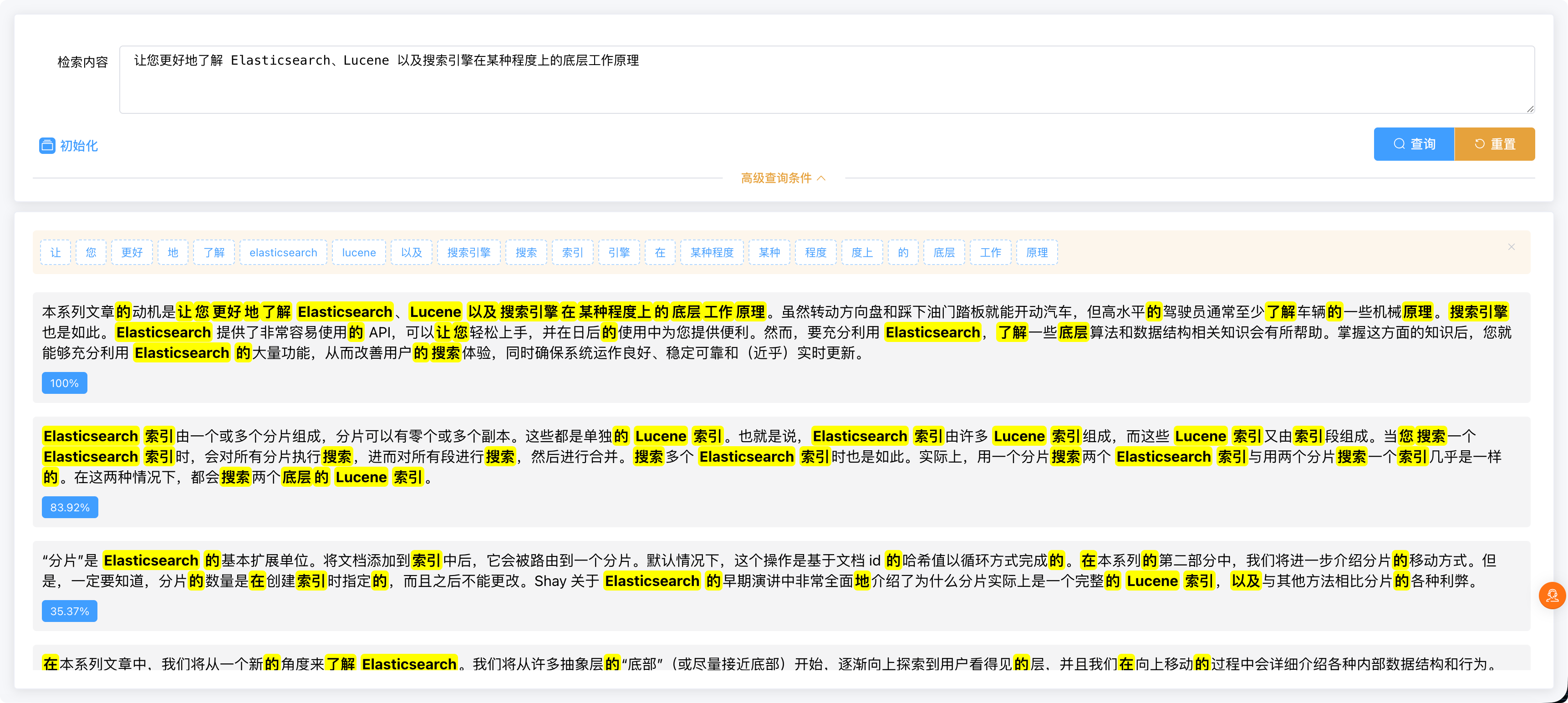
前端部分就略过了,主要看效果:
匹配度 = 当前得分 / 最大得分
五、中文分词支持(IK Analyzer)
发现中文没分词,默认是按单个字匹配。验证下:
POST /demo/_analyze
{"field": "contentbody","text": "搜索引擎"
}
果然,默认没有中文分词。
1. 安装 analysis-ik 插件
# 进入docker容器
docker exec -it elasticsearch bash
# 注意跟es版本一致,不要高于es版本
elasticsearch-plugin install https://get.infini.cloud/elasticsearch/analysis-ik/8.19.6
# 重启
exit
docker restart elasticsearch
# 验证
docker exec -it elasticsearch bash
elasticsearch-plugin list
2. 修改索引映射:
// resources/esmapper/demo.xml
<properties><property name="createDemoIndice">..."contentBody": {"type": "text","analyzer": "ik_max_word","search_analyzer": "ik_max_word"}...</property><property name="testHighlightSearch" cacheDsl="false">..."match" : {"contentBody" : {"query" : #[condition],"analyzer": "ik_max_word"}}...        </property><!-- 分词查询 --><property name="analyzeQuery" cacheDsl="false"><![CDATA[{##"analyzer": "standard","analyzer": "ik_max_word","text": #[condition]}]]></property>
</properties>
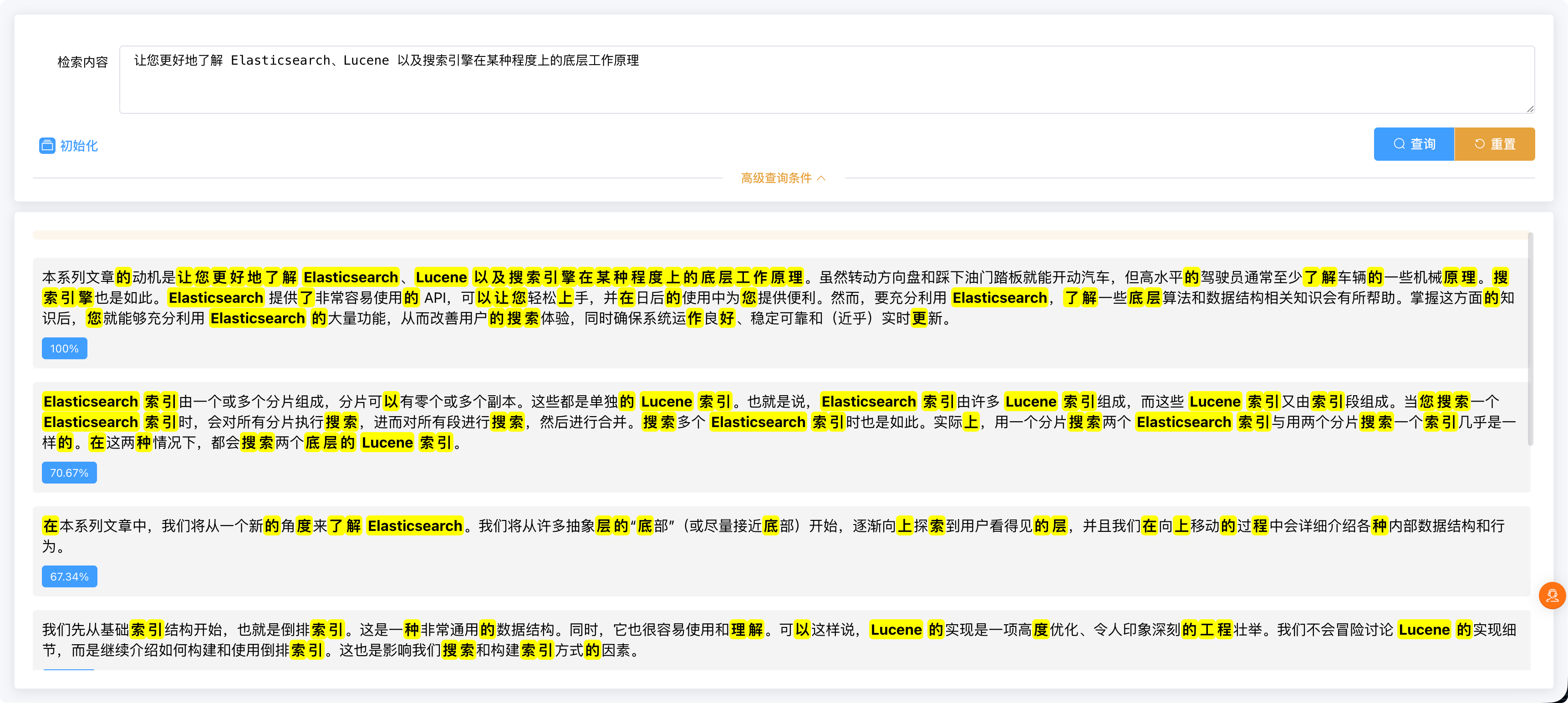
重启项目、重新初始化数据,再搜索一下,完美分词 ✅
六、效果展示
至此,一个小巧的 Elasticsearch 高亮搜索 + 匹配度演示 Demo 就完成了。
下周领导要看效果?没问题,稳妥得很 😎