
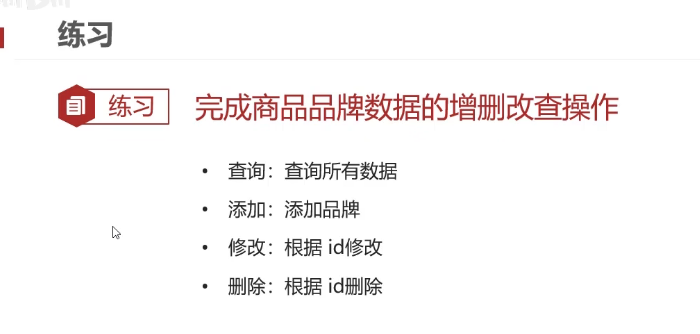
- 环境准备:
- 数据库表 tb_brand
- 实体类 Brand
- 测试用例
查询所有数据
package com.itheima.example;import com.itheima.pojo.Brand;
import org.junit.Test;import java.sql.*;
import java.util.ArrayList;/*** 品牌数据的增删改查操作*/public class BrandTest {/*** 查询所有* 1.SQL:select * from tb_brand;* 2.参数:不需要* 3.结果:List<Brand>* @throws Exception*/@Testpublic void testSelectALL() throws Exception {//获取连接String url = "jdbc:mysql:///day02";String username = "root";String password = "wwh030705";Connection conn = DriverManager.getConnection(url, username, password);//定义sqlString sql = "select * from tb_brand";//获取pstmt对象PreparedStatement pstmt = conn.prepareStatement(sql);//设置参数//执行sqlResultSet rs = pstmt.executeQuery();//处理结果 List<Brand> 封装Brand对象,装载List集合Brand brand = null;ArrayList<Brand> brands = new ArrayList<>();while(rs.next()){//获取数据int id = rs.getInt("id");String brandName = rs.getString("brand_name");String companyName = rs.getString("company_name");int ordered = rs.getInt("ordered");String description = rs.getString("description");int status = rs.getInt("status");//封装Brand对象brand = new Brand();brand.setId(id);brand.setBrandName(brandName);brand.setCompanyName(companyName);brand.setOrdered(ordered);brand.setDescription(description);brand.setStatus(status);//装载集合brands.add(brand);}System.out.println(brands);//释放资源rs.close();pstmt.close();conn.close();}}
添加:
-
编写SQL
insert into tb_brand (brand_name,company_name,ordered,description,status) values (?,?,?,?,?) -
是否需要参数?需要:除了id之外的所有数据
-
返回结果如何封装?boolean
/*** 添加* 1.SQL:select * from tb_brand;* 2.参数:需要,除了id之外所有的参数* 3.结果:boolean* @throws Exception*/@Testpublic void testSelectAdd() throws Exception {//接受页面提交的参数String brandName = "香飘飘";String companyName = "香飘飘";int ordered = 1;String description = "绕地球一圈";int status = 1;//获取连接String url = "jdbc:mysql:///day02";String username = "root";String password = "wwh030705";Connection conn = DriverManager.getConnection(url, username, password);//定义sqlString sql = "insert into tb_brand (brand_name,company_name,ordered,description,status) values (?,?,?,?,?)";//获取pstmt对象PreparedStatement pstmt = conn.prepareStatement(sql);//设置参数pstmt.setString(1,brandName);pstmt.setString(2,companyName);pstmt.setInt(3,ordered);pstmt.setString(4,description);pstmt.setInt(5,status);//执行sqlint count = pstmt.executeUpdate();//影响行数//处理结果System.out.println(count > 0);//释放资源pstmt.close();conn.close();}修改
-
编写SQL语句
update tb_brand set brand_name = ?,company_name = ?,ordered = ?,description = ?,status = ? where id = ? -
是否需要参数?需要:Brand对象所有数据
-
返回结果如何封装?boolean
/*** 修改* 1.SQL:* update tb_brand* set brand_name = ?,* company_name = ?,* ordered = ?,* description = ?,* status = ?* where id = ?* 2.参数:需要,所有数据* 3.结果:boolean* @throws Exception*/@Testpublic void testUpdate() throws Exception {//接受页面提交的参数String brandName = "香飘飘";String companyName = "香飘飘";int ordered = 1000;String description = "绕地球三圈";int status = 1;int id = 4;//获取连接String url = "jdbc:mysql:///day02";String username = "root";String password = "wwh030705";Connection conn = DriverManager.getConnection(url, username, password);//定义sqlString sql = "update tb_brand set brand_name = ?,company_name = ?,ordered = ?,description = ?,status = ? where id = 4";//获取pstmt对象PreparedStatement pstmt = conn.prepareStatement(sql);//设置参数pstmt.setString(1,brandName);pstmt.setString(2,companyName);pstmt.setInt(3,ordered);pstmt.setString(4,description);pstmt.setInt(5,status);//执行sqlint count = pstmt.executeUpdate();//影响行数//处理结果System.out.println(count > 0);//释放资源pstmt.close();conn.close();}
删除:
-
编写SQL语句
delete from tb_brand where id = ? -
是否需要参数?需要:id
-
返回结果如何封装?boolean
/*** 删除* 1.SQL:delete from tb_brand where id = ?* 2.参数:需要,id* 3.结果:boolean* @throws Exception*/@Testpublic void testDelete() throws Exception {//接受页面提交的参数int id = 4;//获取连接String url = "jdbc:mysql:///day02";String username = "root";String password = "wwh030705";Connection conn = DriverManager.getConnection(url, username, password);//定义sqlString sql = "delete from tb_brand where id = ?";//获取pstmt对象PreparedStatement pstmt = conn.prepareStatement(sql);//设置参数pstmt.setInt(1,id);//执行sqlint count = pstmt.executeUpdate();//影响行数//处理结果System.out.println(count > 0);//释放资源pstmt.close();conn.close();}