拓冰网站定制
一、概述
上一篇文章,已经实现了导航区域跳转,接下来要实现商品列表展示。
首页展示的,商品信息以及商品列表也,展示的页面数据,布局都是一样的。
没有必要重复写代码,因此可以将这些相同的内容,封装成一个组件,然后调用即可,节省代码,调试也方便。
二、封装组件
在uni-app x项目根目录,创建components目录,专门用来存放组件。然后在里面,创建文件。components目录结构如下:
components
└── goods-list└── goods-list.uvue
打开pages/index/index.uvue文件,将商品列表的view标签内容,以及css样式,剪切到文件components/goods-list/goods-list.uvue
goods-list.uvue完整内容如下:
<template><view><view class="goods_list"><view class="goods_item" v-for="item in goods" :key="item.id"><image :src="item.img_url" mode=""></image><view class="price"><text>¥{{item.sell_price}}</text><text>¥{{item.market_price}}</text></view><view class="name">{{item.title}}</view></view></view></view>
</template><script>export default {props: ['goods'],data() {return {}},methods: {}}
</script><style lang="scss">.goods_list {padding: 0 15rpx;display: flex;flex-direction: row; //横向排列flex-wrap: wrap;justify-content: space-between;.goods_item {background: #fff;width: 355rpx;margin: 10rpx 0;padding: 15rpx;box-sizing: border-box;image {width: 80%;height: 150px;display: block;margin: auto; //图片居中
            }.price {display: flex;flex-direction: row;color: $shop-color;font-size: 36rpx;// margin-top: 15rpx;margin: 20rpx 0 5rpx 0;text:nth-child(2) {color: #ccc;font-size: 28rpx;margin-top: 5rpx;margin-left: 17rpx;text-decoration-line: line-through;}}.name {font-size: 38rpx;line-height: 50rpx;padding-bottom: 15rpx;padding-top: 10rpx;}}}
</style>
说明:
<template>里边的view内容,是从index.uvue里面,剪切过来的。
<style>里边的css内容,是从index.uvue里面,剪切过来的。 需要注意的是,<style>必须指定为lang="scss",否则css样式会报错。
<script>里边,props: ['goods'],这个表示组件接收参数goods,用来渲染商品列表数据。
三、首页引用组件
修改pages/index/index.uvue文件,导入组件商品列表,并使用。
index.uvue完整代码如下:
<template><view class="home"><!-- 轮播区域 --><up-swiper :list="swiper" keyName="img" indicator indicatorMode="dot" circular></up-swiper><!-- 导航区域 --><view class="nav"><view class="nav_item" v-for="(item,index) in navs" :key="index" @click="nav_item_click(item.path)"><view :class="item.icon"></view><text>{{item.title}}</text></view></view><!-- 推荐商品 --><view class="hot_goods"><view class="tit">推荐商品</view><GoodsList :goods="goods"></GoodsList></view></view>
</template><script>import GoodsList from '../../components/goods-list/goods-list.uvue'export default {components: {GoodsList: GoodsList},data() {return {title: 'Hello',swiper: [],goods: [],navs: [{icon: 'iconfont icon-ziyuan',title: '网上超市',path: '/pages/goods/goods'},{icon: 'iconfont icon-guanyuwomen',title: '联系我们',path: '/pages/contact/contact'},{icon: 'iconfont icon-tupian',title: '社区图片',path: '/pages/pics/pics'},{icon: 'iconfont icon-shipin',title: '直播中心',path: '/pages/videos/videos'}]}},onLoad() {this.get_swiper()this.get_goods()},methods: {// 获取轮播图的数据
            async get_swiper() {try {const res = await this.$http.get('/api/getlunbo', {})// console.log("res", res)this.swiper = res.message} catch (err : any) {// console.error('获取轮播图失败', err)
                    uni.showToast({title: '获取轮播图失败' + err.statusCode,});}},// 获取热门商品列表数据
            async get_goods() {try {const res = await this.$http.get('/api/getgoods?pageindex=1', {})// console.log("res", res)this.goods = res.message} catch (err : any) {// console.error('获取轮播图失败', err)
                    uni.showToast({title: '获取热门商品列表失败' + err.statusCode,});}},// 导航点击的处理函数
            nav_item_click(path) {console.log("path", path)uni.navigateTo({url: path})}}}
</script><style lang="scss">.home {swiper {width: 750rpx;height: 380rpx;image: {height: 100%;width: 100%;}}.nav {display: flex;flex-direction: row; //横向排列justify-content: space-around; //平均分布在一行
.nav_item {text-align: center;view {width: 120rpx;height: 120rpx;background: $shop-color;border-radius: 60rpx;margin: 10px auto;line-height: 120rpx;color: white;font-size: 50rpx;text-align: center;}.icon-tupian {font-size: 45rpx;}text {font-size: 30rpx;}}}.hot_goods {background: #eee;overflow: hidden;margin-top: 10px;.tit {height: 50px;line-height: 50px;color: $shop-color;text-align: center;letter-spacing: 20px;background: #fff;margin: 7rpx 0;}}}
</style>
注意,关键代码,主要有几个地方:
import GoodsList from '../../components/goods-list/goods-list.uvue'
export default {components: {GoodsList: GoodsList},
组件的名字,最好用驼峰命名发,不要带有横线。
在<template>里面使用组件,并传递参数
<GoodsList :goods="goods"></GoodsList>
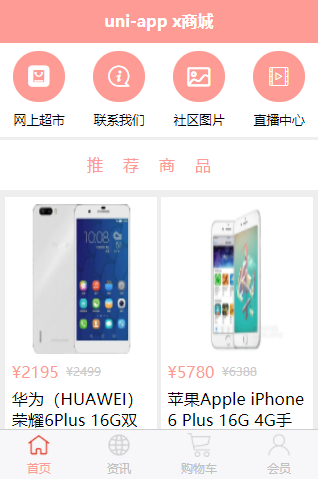
重新编译代码,运行,确保首页商品信息,展示正常。
四、商品列表页面引用组件
修改 pages/goods/goods.uvue文件
完整代码如下:
<template><view class="goods_list"><GoodsList :goods="goods"></GoodsList></view>
</template><script>import GoodsList from '../../components/goods-list/goods-list.uvue'export default {components: {GoodsList: GoodsList},data() {return {goods: [],pageindex: 1}},onLoad() {this.get_goods()},methods: {// 获取商品列表数据
            async get_goods() {try {const res = await this.$http.get('/api/getgoods?pageindex=' + this.pageindex, {})console.log("res", res)this.goods = res.message} catch (err : any) {
                    uni.showToast({title: '获取商品列表失败' + err.statusCode,});}},}}
</script><style lang="scss">.goods_list {background: #eee;}
</style>
说明:
这里导入组件,引用组件方式,和首页是一样的。
但需要注意的是,这里的调用api接口,和首页是有区别的。
首页,是显示1页。 这里需要进行动态分页展示
编译代码,重新运行,效果如下:
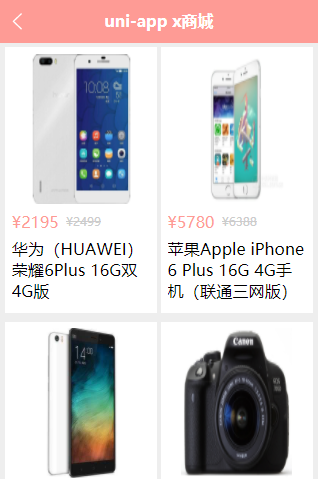
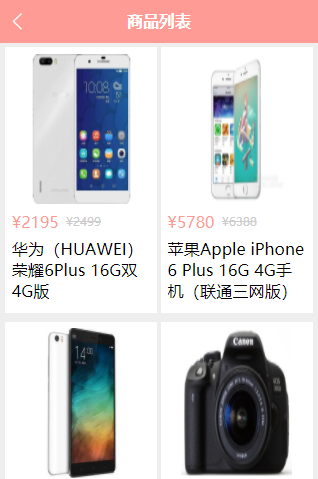
这里的标题显示不对,还需要修改pages.json文件
只需要修改goods的路由配置
{"path": "pages/goods/goods","style": {"navigationBarTitleText": "商品列表"}
},
再次编译运行,效果如下: