

nvm管理node

1.查看nvm管理的node版本
C:\Users\10078>nvm ls* 20.12.0 (Currently using 64-bit executable)
2.查看在使用的node版本
C:\Users\10078>node -v
v20.12.0
3.查看nvm可以管理安装的node版本
C:\Users\10078>nvm list available|   CURRENT    |     LTS      |  OLD STABLE  | OLD UNSTABLE |
|--------------|--------------|--------------|--------------|
|    21.7.1    |   20.12.0    |   0.12.18    |   0.11.16    |
|    21.7.0    |   20.11.1    |   0.12.17    |   0.11.15    |
|    21.6.2    |   20.11.0    |   0.12.16    |   0.11.14    |
|    21.6.1    |   20.10.0    |   0.12.15    |   0.11.13    |
|    21.6.0    |    20.9.0    |   0.12.14    |   0.11.12    |
|    21.5.0    |   18.20.0    |   0.12.13    |   0.11.11    |
|    21.4.0    |   18.19.1    |   0.12.12    |   0.11.10    |
|    21.3.0    |   18.19.0    |   0.12.11    |    0.11.9    |
|    21.2.0    |   18.18.2    |   0.12.10    |    0.11.8    |
|    21.1.0    |   18.18.1    |    0.12.9    |    0.11.7    |
|    21.0.0    |   18.18.0    |    0.12.8    |    0.11.6    |
|    20.8.1    |   18.17.1    |    0.12.7    |    0.11.5    |
|    20.8.0    |   18.17.0    |    0.12.6    |    0.11.4    |
|    20.7.0    |   18.16.1    |    0.12.5    |    0.11.3    |
|    20.6.1    |   18.16.0    |    0.12.4    |    0.11.2    |
|    20.6.0    |   18.15.0    |    0.12.3    |    0.11.1    |
|    20.5.1    |   18.14.2    |    0.12.2    |    0.11.0    |
|    20.5.0    |   18.14.1    |    0.12.1    |    0.9.12    |
|    20.4.0    |   18.14.0    |    0.12.0    |    0.9.11    |
|    20.3.1    |   18.13.0    |   0.10.48    |    0.9.10    |This is a partial list. For a complete list, visit https://nodejs.org/en/download/releases
4.安装需要的node版本
C:\Users\10078>nvm install 18.12.1
Downloading node.js version 18.12.1 (64-bit)...
Extracting node and npm...
Complete
npm v8.19.2 installed successfully.Installation complete. If you want to use this version, typenvm use 18.12.1
5.使用需要的node版本
C:\Users\10078>nvm ls* 20.12.0 (Currently using 64-bit executable)18.12.1C:\Users\10078>nvm use 18.12.1
Now using node v18.12.1 (64-bit)C:\Users\10078>node -v
v18.12.1
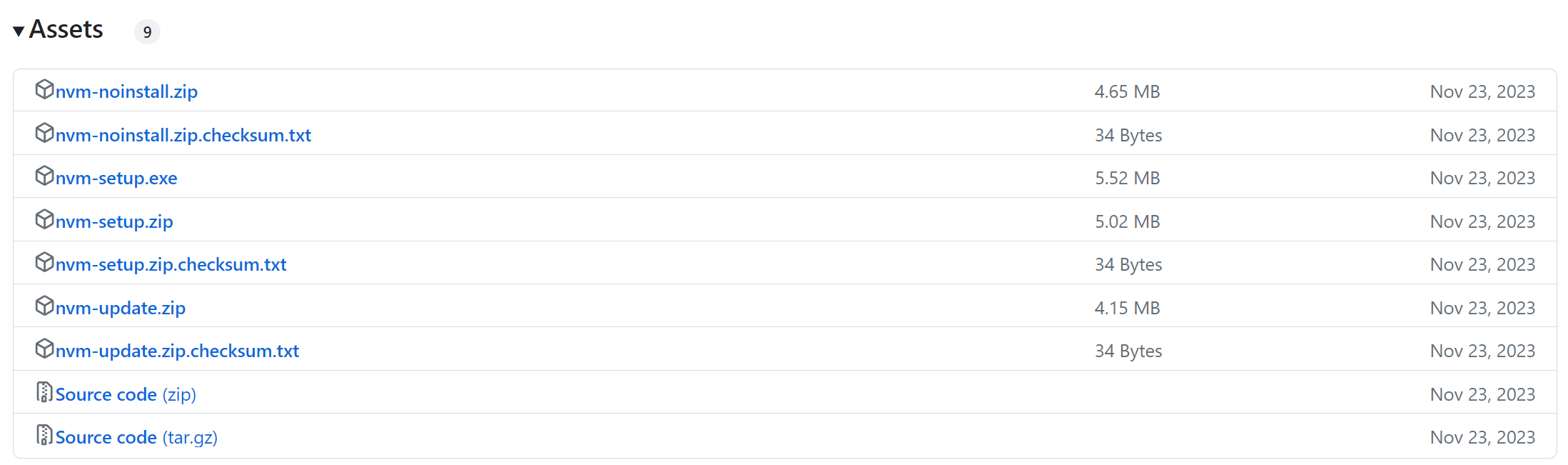
注:nvm下载地址==>https://github.com/coreybutler/nvm-windows/releases/tag/1.1.12
element-plus本地启动
下载地址:
需要安装的命令
D:\software\workspace\element-plus>pnpm install
Scope: all 17 workspace projects
Lockfile is up to date, resolution step is skipped
Packages: +1553D:\software\workspace\element-plus>npm install pnpm -gadded 1 package in 4s1 package is looking for funding
run `npm fund` for details
查看安装的版本
D:\software\workspace\element-plus>pnpm -v
8.15.5
启动
D:\software\workspace\element-plus>npm run dev> dev
> pnpm -C play dev> @element-plus/play@ dev D:\software\workspace\element-plus\play
> vitevite v2.9.15 dev server running at:> Network:  http://192.168.3.8:3000/> Local:    http://localhost:3000/
ready in 3477ms.
如有帮助希望点个推荐;如果没帮助到或者内容有错误,可以下面留言,谢谢!
相关新闻

2026/7/27 11:27:26
LG10641

2026/7/24 7:05:25
LG11068

2026/7/28 3:14:22
scp拷贝文件报错

2026/7/28 10:13:23
猫抓浏览器扩展:3分钟学会智能视频嗅探下载的终极指南

2026/7/28 10:12:00
AI工具如何优化学术写作与研究流程

2026/7/28 10:12:00
2026肇庆市卖黄金别踩坑!全域五家靠谱门店实测评级,这份避坑指南请收好_转自TXT - 余情未了888

2026/7/28 10:11:48
跨马翻译在短视频本地化中的创新实践

2026/7/28 10:10:07
树莓派摄像头GUI开发:PySide6与QML实战指南

2026/7/28 10:09:16
GLM-5.2 重写操作系统应用:AI 编程如何重塑软件开发范式

2026/7/28 5:30:41
技术焦虑下的业务聚焦:构建可持续的技术竞争力
,免费生成专属「提分热力图」与瓶颈突破路线图)
2026/7/27 8:51:27
仅限本周开放|GMAT AI备考效能评估工具(含ETS官方题库行为轨迹比对模块),免费生成专属「提分热力图」与瓶颈突破路线图

2026/7/28 3:03:12
AI时代SEO新标配:Schema结构化数据与llms.txt实战指南

2026/7/28 0:02:42
抖音图文怎么保存不带水印?2026 合规去水印方法实测 - 耶斯去水印

2026/7/28 0:02:42
德语论文辅导平台对比与选择建议

2026/7/28 0:02:42
FastAPI 进阶三部曲:中间件、依赖注入与 ORM 实战
![[C++]内存管理:串顺序存储的内存回收](http://pic.xiahunao.cn/yaotu/[C++]内存管理:串顺序存储的内存回收)
2026/7/27 13:53:17
[C++]内存管理:串顺序存储的内存回收
:ArkUI 首页仪表盘搭建)
2026/7/27 13:53:19
足球口袋教练 HarmonyOS 离线应用实战(03/20):ArkUI 首页仪表盘搭建

2026/7/26 19:42:19