 拓冰网站定制
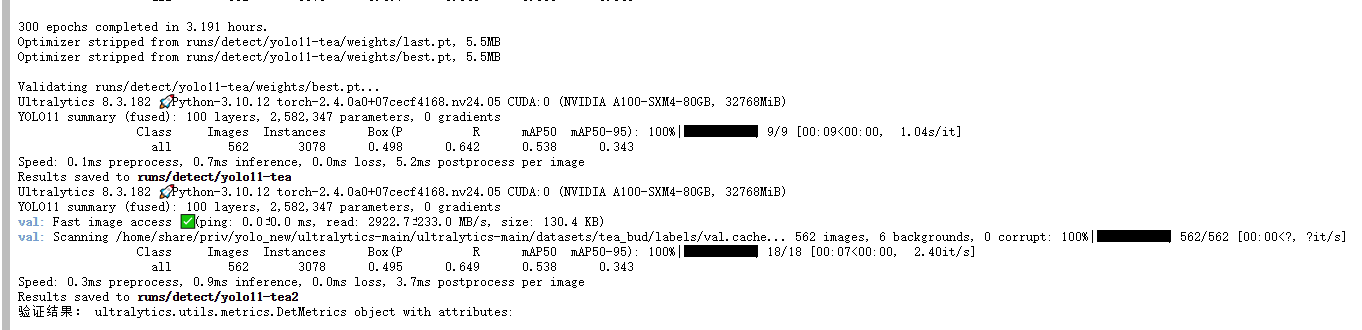
使用的是yolo11 + tea 跑的尝试的代码,感觉效果不是很好。
现在我使用我之前加的那些模块,看看他的效果怎么样。
使用自己的电脑测试数据集:
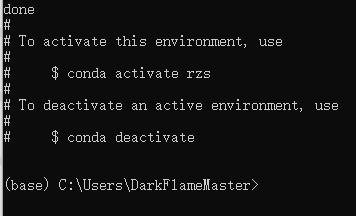
显示已有的训练环境:
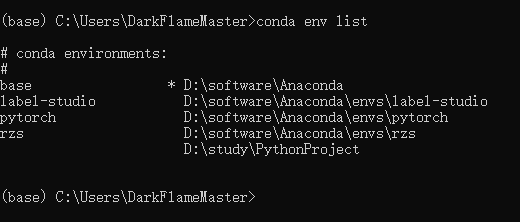
启动label-studio:
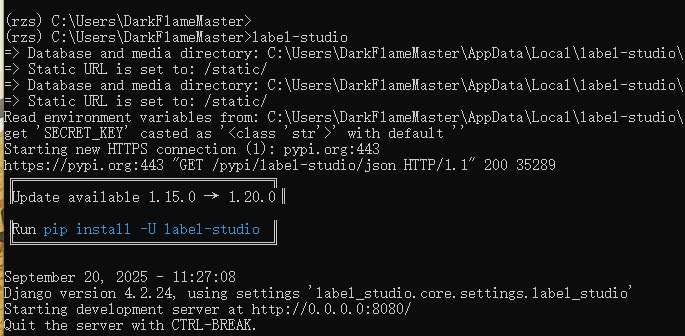
需要
setx LOCAL_FILES_DOCUMENT_ROOT "F:\master\dataset\tea_bud\images\train"
才能正确出现图片
set LABEL_STUDIO_LOCAL_FILES_SERVING_ENABLED=true
set LABEL_STUDIO_LOCAL_FILES_DOCUMENT_ROOT=F:\master\dataset\tea_bud
使用脚本来生成JSON文件:
import os
import json
from PIL import Image
import urllib.parsedef yolo_to_label_studio_correct_path(image_dir, labels_dir, class_list, output_json="tea_diseases_labels.json"):"""将 YOLO 格式转换为 Label Studio JSON 格式使用正确的图片路径格式"""tasks = []# 获取所有图片文件image_files = [f for f in os.listdir(image_dir) if f.lower().endswith(('.jpg', '.jpeg', '.png', '.bmp'))]print(f"找到 {len(image_files)} 个图片文件")processed_count = 0error_count = 0for image_file in image_files:image_path = os.path.join(image_dir, image_file)label_file = os.path.join(labels_dir, os.path.splitext(image_file)[0] + '.txt')# 创建正确的图片路径格式# 使用 URL 编码的路径,保持 images\filename.jpg 格式encoded_image_path = f"images%5C{image_file}"  # %5C 是反斜杠的 URL 编码image_url = f"/data/local-files/?d={encoded_image_path}"# 创建任务基础结构task = {"data": {"image": image_url},"annotations": [],"predictions": []}# 如果标签文件存在,读取并转换if os.path.exists(label_file):try:# 获取图片尺寸with Image.open(image_path) as img:img_width, img_height = img.sizewith open(label_file, 'r', encoding='utf-8') as f:lines = f.readlines()predictions = []for i, line in enumerate(lines):parts = line.strip().split()if len(parts) == 5:  # YOLO格式: class x_center y_center width heightclass_id, x_center, y_center, width, height = map(float, parts)# 转换 YOLO 格式到像素坐标x_center_px = x_center * img_widthy_center_px = y_center * img_heightwidth_px = width * img_widthheight_px = height * img_height# 计算边界框坐标x_min = x_center_px - width_px / 2y_min = y_center_px - height_px / 2# 转换为百分比坐标(Label Studio 格式)x_percent = (x_min / img_width) * 100y_percent = (y_min / img_height) * 100width_percent = (width_px / img_width) * 100height_percent = (height_px / img_height) * 100# 确保坐标在合理范围内x_percent = max(0, min(x_percent, 100))y_percent = max(0, min(y_percent, 100))width_percent = max(0, min(width_percent, 100 - x_percent))height_percent = max(0, min(height_percent, 100 - y_percent))prediction = {"id": f"result_{i}","type": "rectanglelabels","from_name": "label","to_name": "image","value": {"rectanglelabels": [class_list[int(class_id)]],"x": x_percent,"y": y_percent,"width": width_percent,"height": height_percent}}predictions.append(prediction)# 如果有预测标注,添加到任务中if predictions:task["predictions"] = [{"model_version": "yolo_model","score": 0.95,"result": predictions}]tasks.append(task)processed_count += 1print(f"处理完成: {image_file} - 找到 {len(predictions)} 个标注")except Exception as e:error_count += 1print(f"处理失败: {image_file} - 错误: {str(e)}")# 即使处理失败,也添加没有标注的任务tasks.append(task)else:# 没有标签文件,只添加图片tasks.append(task)print(f"无标签文件: {image_file}")# 保存为 JSON 文件with open(output_json, 'w', encoding='utf-8') as f:json.dump(tasks, f, indent=2, ensure_ascii=False)print(f"\n转换完成!")print(f"成功处理: {processed_count} 个文件")print(f"处理失败: {error_count} 个文件")print(f"总任务数: {len(tasks)}")print(f"输出文件: {output_json}")return output_json# 测试单个任务生成
def test_single_task():"""测试单个任务的格式"""test_task = {"data": {"image": "/data/local-files/?d=images%5Ctest_image.jpg"},"annotations": [],"predictions": [{"model_version": "yolo_model","score": 0.95,"result": [{"id": "result1","type": "rectanglelabels","from_name": "label","to_name": "image","value": {"rectanglelabels": ["tea_blight"],"x": 10.5,"y": 20.3,"width": 15.2,"height": 12.8}}]}]}print("测试任务格式:")print(json.dumps(test_task, indent=2))return test_task# 你的具体配置
if __name__ == "__main__":# 先测试格式test_single_task()# 你的路径配置image_dir = r"F:\master\dataset\new_dataset\teaDiseases\train\images"labels_dir = r"F:\master\dataset\new_dataset\teaDiseases\train\labels"# 你的类别列表 - 请根据实际情况修改!# 这里的类别顺序必须与你的 YOLO 类别 ID 对应class_list = ["algal leaf spot", "brown blight", "grey blight"]  # 修改为你的实际类别# 检查目录是否存在if not os.path.exists(image_dir):print(f"错误: 图片目录不存在: {image_dir}")elif not os.path.exists(labels_dir):print(f"错误: 标签目录不存在: {labels_dir}")else:# 运行转换json_file = yolo_to_label_studio_correct_path(image_dir=image_dir,labels_dir=labels_dir,class_list=class_list,output_json="tea_diseases_labels.json")# 显示前几个任务作为示例with open(json_file, 'r', encoding='utf-8') as f:tasks = json.load(f)print("\n前3个任务示例:")for i in range(min(3, len(tasks))):print(f"\n任务 {i+1}:")print(json.dumps(tasks[i], indent=2))