 拓冰网站定制
虚幻编辑器设置


案例1——控制物体的移动
创建一个蓝图

创建一个C++ Class

把脚本挂到蓝图中,并在脚本下面挂上一个静态的Mesh
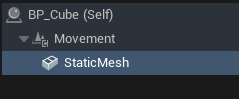
进IDE编写代码
NewMovement.h
// Fill out your copyright notice in the Description page of Project Settings.#pragma once#include "CoreMinimal.h"
#include "Components/SceneComponent.h"
#include "NewMovement.generated.h"UCLASS( ClassGroup=(Custom), meta=(BlueprintSpawnableComponent) )
class MYPROJECT_API UNewMovement : public USceneComponent
{GENERATED_BODY()public:// Sets default values for this component's propertiesUNewMovement();protected:// Called when the game startsvirtual void BeginPlay() override;public:// Called every framevirtual void TickComponent(float DeltaTime, ELevelTick TickType, FActorComponentTickFunction* ThisTickFunction) override;// 成员变量UPROPERTY(EditAnywhere, Category = "Movement")FVector MoveOffset;  // 移动偏移UPROPERTY(EditAnywhere, Category = "Movement")float Speed = 100.0f;  // 移动速度FVector StartLocation;  // 初始位置FVector MoveOffsetNormal;   // 归一化后的移动偏移float EndDistance;      // 总移动距离float CurrentDistance = 0.0f;  // 当前移动的距离int32 DirectionMove = 1; };
NewMovement.cpp
// Fill out your copyright notice in the Description page of Project Settings.#include "NewMovement.h"// Sets default values for this component's properties
UNewMovement::UNewMovement()
{
// Set this component to be initialized when the game starts, and to be ticked every frame.  You can turn these features// off to improve performance if you don't need them.
PrimaryComponentTick.bCanEverTick = true;// ...
}// Called when the game starts
void UNewMovement::BeginPlay()
{
Super::BeginPlay();
StartLocation = this->GetRelativeLocation();
EndDistance = MoveOffset.Length();
//归一化
MoveOffset.Normalize();
MoveOffsetNormal = MoveOffset;}// Called every frame
void UNewMovement::TickComponent(float DeltaTime, ELevelTick TickType, FActorComponentTickFunction* ThisTickFunction)
{
Super::TickComponent(DeltaTime, TickType, ThisTickFunction);
//设置物体的相对位置
SetRelativeLocation(StartLocation + CurrentDistance * MoveOffsetNormal);
//更新当前的移动距离
CurrentDistance += DeltaTime * Speed * DirectionMove;
//方向反转
if (CurrentDistance >= EndDistance || CurrentDistance <= 0.0f){
DirectionMove *= -1;}
}
效果:
