
vue 甘特图 vxe-gantt 任务里程碑类型的配置用法
查看官网:https://gantt.vxeui.com/
gitbub:https://github.com/x-extends/vxe-gantt
gitee:https://gitee.com/x-extends/vxe-gantt
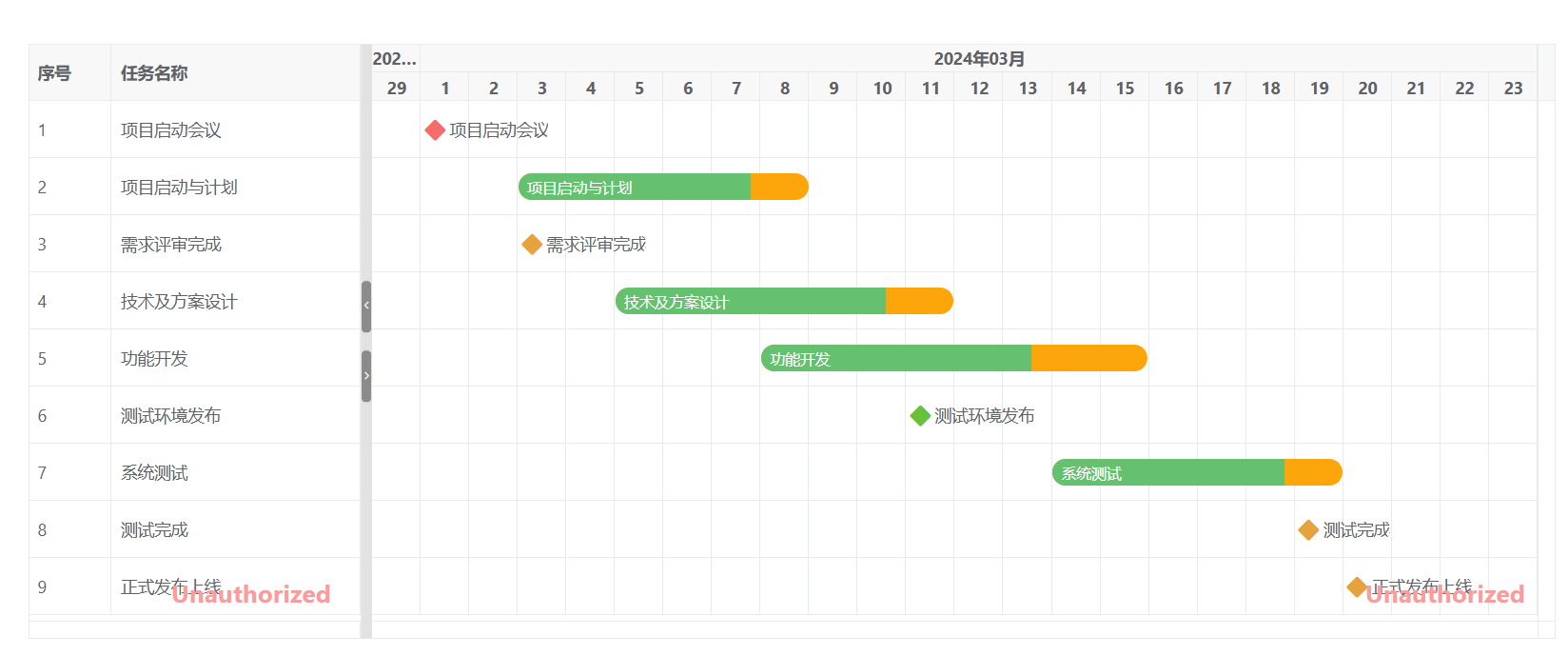
通过设置 task-bar-milestone-config 和 type=moveable 启用里程碑类型
<template><div><vxe-gantt v-bind="ganttOptions"></vxe-gantt></div>
</template><script setup>
import { reactive } from 'vue'
import { VxeGanttTaskType } from 'vxe-gantt'const ganttOptions = reactive({border: true,height: 500,taskBarConfig: {showProgress: true, // 是否显示进度条showContent: true, // 是否在任务条显示内容moveable: true, // 是否允许拖拽任务移动日期resizable: true, // 是否允许拖拽任务调整日期barStyle: {round: true, // 圆角bgColor: '#fca60b', // 任务条的背景颜色completedBgColor: '#65c16f' // 已完成部分任务条的背景颜色}},taskViewConfig: {tableStyle: {width: 280 // 表格宽度},gridding: {leftSpacing: 1, // 左侧间距多少列rightSpacing: 4 // 右侧间距多少列}},taskBarMilestoneConfig: {// 自定义里程碑图标状态颜色iconStatus ({ row }) {if (row.id === 10001) {return 'error'}if (row.id === 10007) {return 'success'}return 'warning'}},columns: [{ type: 'seq', width: 70 },{ field: 'title', title: '任务名称' }],data: [{ id: 10001, title: '项目启动会议', start: '2024-03-01', end: '', progress: 0, type: VxeGanttTaskType.Milestone },{ id: 10002, title: '项目启动与计划', start: '2024-03-03', end: '2024-03-08', progress: 80, type: '' },{ id: 10003, title: '需求评审完成', start: '2024-03-03', end: '', progress: 0, type: VxeGanttTaskType.Milestone },{ id: 10004, title: '技术及方案设计', start: '2024-03-05', end: '2024-03-11', progress: 80, type: '' },{ id: 10005, title: '功能开发', start: '2024-03-08', end: '2024-03-15', progress: 70, type: '' },{ id: 10007, title: '测试环境发布', start: '2024-03-11', end: '', progress: 0, type: VxeGanttTaskType.Milestone },{ id: 10008, title: '系统测试', start: '2024-03-14', end: '2024-03-19', progress: 80, type: '' },{ id: 10009, title: '测试完成', start: '2024-03-19', end: '', progress: 0, type: VxeGanttTaskType.Milestone },{ id: 10010, title: '正式发布上线', start: '2024-03-20', end: '', progress: 0, type: VxeGanttTaskType.Milestone }]
})
</script>
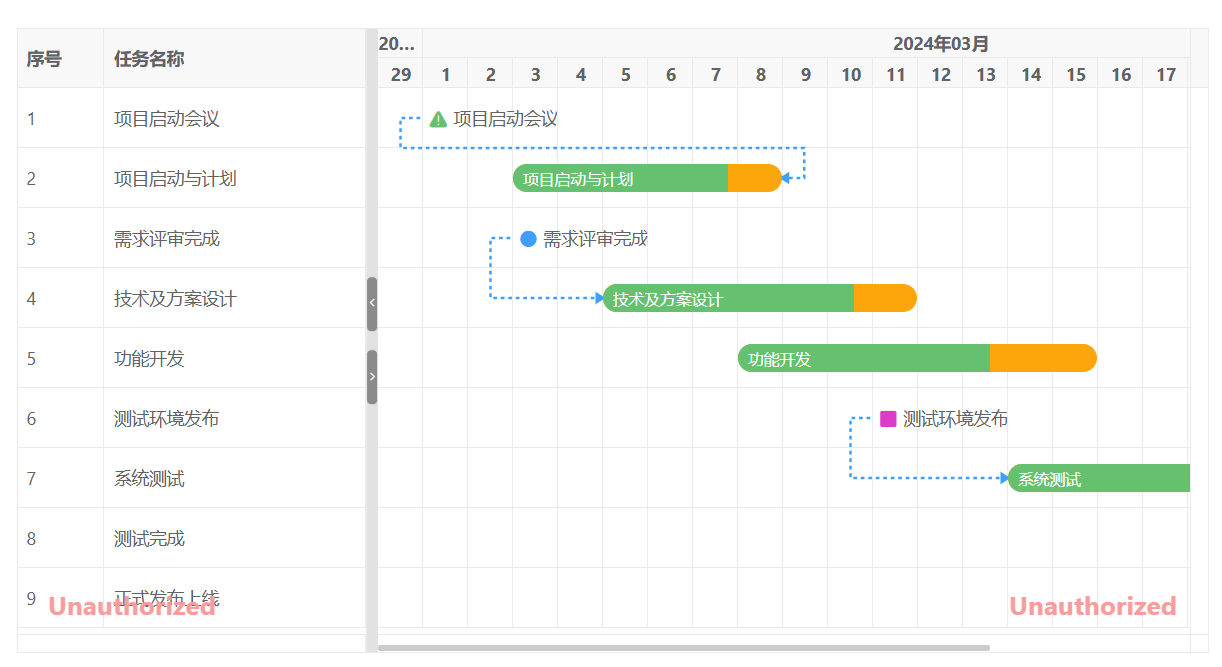
使用依赖线
<template><div><vxe-gantt v-bind="ganttOptions"></vxe-gantt></div>
</template><script setup>
import { reactive } from 'vue'
import { VxeGanttDependencyType, VxeGanttTaskType } from 'vxe-gantt'const ganttOptions = reactive({border: true,height: 500,rowConfig: {keyField: 'id' // 行主键},taskBarConfig: {showProgress: true, // 是否显示进度条showContent: true, // 是否在任务条显示内容moveable: true, // 是否允许拖拽任务移动日期resizable: true, // 是否允许拖拽任务调整日期barStyle: {round: true, // 圆角bgColor: '#fca60b', // 任务条的背景颜色completedBgColor: '#65c16f' // 已完成部分任务条的背景颜色}},taskViewConfig: {tableStyle: {width: 280 // 表格宽度},gridding: {leftSpacing: 1, // 左侧间距多少列rightSpacing: 4 // 右侧间距多少列}},taskBarMilestoneConfig: {// 自定义里程碑图标icon ({ row }) {if (row.id === 10001) {return 'vxe-icon-warning-triangle-fill'}if (row.id === 10007) {return 'vxe-icon-square-fill'}if (row.id === 10009) {return 'vxe-icon-warning-circle-fill'}return 'vxe-icon-radio-unchecked-fill'},// 自定义里程碑图标样式iconStyle ({ row }) {if (row.id === 10001) {return {color: '#65c16f'}}if (row.id === 10007) {return {color: '#dc3cc7'}}}},taskLinkConfig: {lineType: 'flowDashed'},links: [{ from: 10001, to: 10002, type: VxeGanttDependencyType.StartToFinish },{ from: 10003, to: 10004, type: VxeGanttDependencyType.StartToStart },{ from: 10007, to: 10008, type: VxeGanttDependencyType.StartToStart },{ from: 10008, to: 10009, type: VxeGanttDependencyType.FinishToStart },{ from: 10009, to: 10010, type: VxeGanttDependencyType.StartToStart }],columns: [{ type: 'seq', width: 70 },{ field: 'title', title: '任务名称' }],data: [{ id: 10001, title: '项目启动会议', start: '2024-03-01', end: '', progress: 0, type: VxeGanttTaskType.Milestone },{ id: 10002, title: '项目启动与计划', start: '2024-03-03', end: '2024-03-08', progress: 80, type: '' },{ id: 10003, title: '需求评审完成', start: '2024-03-03', end: '', progress: 0, type: VxeGanttTaskType.Milestone },{ id: 10004, title: '技术及方案设计', start: '2024-03-05', end: '2024-03-11', progress: 80, type: '' },{ id: 10005, title: '功能开发', start: '2024-03-08', end: '2024-03-15', progress: 70, type: '' },{ id: 10007, title: '测试环境发布', start: '2024-03-11', end: '', progress: 0, type: VxeGanttTaskType.Milestone },{ id: 10008, title: '系统测试', start: '2024-03-14', end: '2024-03-19', progress: 80, type: '' },{ id: 10009, title: '测试完成', start: '2024-03-19', end: '', progress: 0, type: VxeGanttTaskType.Milestone },{ id: 10010, title: '正式发布上线', start: '2024-03-20', end: '', progress: 0, type: VxeGanttTaskType.Milestone }]
})
</script>
https://gitee.com/x-extends/vxe-gantt