拓冰网站定制

个人主页:♡喜欢做梦
欢迎 点赞 ➕关注 ❤️收藏 评论
目录
前言
MyBatis XML配置文件的作用
配置数据库连接字符串和MyBatis
数据库配置
application.yml 配置内容
application.properties 配置内容
MyBatis配置
application.yml 配置内容
application.properties 配置内容
XML文件的核心组成成分
MyBatis的xml固定格式
文件创建
创建Mapper接口
创建xml文件
增删查改操作
增(Insert)
删除(delete)
查(select)
改(update)
前言
MyBatis的开发方式有两种:注解、XML。下来要将的就是XML,如果想要看MyBatis注解的,可以看我上一篇文章
MyBatis XML配置文件的作用
MyBatis是一款持久层框架,他支持将SQL语句与Java代码分离,XML文件就是用来编写SQL语句,配置结果映射(ResultMap)等信息载体,让代码等清晰、维护更方便。
配置数据库连接字符串和MyBatis
数据库配置
application.yml 配置内容
# 数据库连接配置
spring:datasource:url: jdbc:mysql://127.0.0.1:3306/mybatis_test?characterEncoding=utf8&useSSL=falseusername: rootpassword: rootdriver-class-name: com.mysql.cj.jdbc.Driver
application.properties 配置内容
#驱动类名称
spring.datasource.driver-class-name=com.mysql.cj.jdbc.Driver
#数据库连接的url
spring.datasource.url=jdbc:mysql://127.0.0.1:3306/mybatis_test?characterEncoding=utf8&useSSL=false
#连接数据库的用户名
spring.datasource.username=root
#连接数据库的密码
spring.datasource.password=root- datasource.url: 数据库连接地址;
- datasource.username:数据库登入用户名(例root);
- datasource.password: 数据库密码(例root);
- datasource.driver-class-name:MySqL驱动类。
MyBatis配置
application.yml 配置内容
mybatis:# 配置 mybatis xml 的文件路径,在 resources/mapper 创建所有表的 xml 文件mapper-locations: classpath:mapper/**Mapper.xmlconfiguration: # 配置打印 MyBatis日志log-impl: org.apache.ibatis.logging.stdout.StdOutImplmap-underscore-to-camel-case: true #配置驼峰自动转换application.properties 配置内容
# 配置 mybatis xml 的文件路径,在 resources/mapper 创建所有表的 xml 文件
mybatis.mapper-locations=classpath:mapper/**Mapper.xml
# 配置打印 MyBatis 日志
mybatis.configuration.log-impl=org.apache.ibatis.logging.stdout.StdOutImpl
# 配置驼峰自动转换
mybatis.configuration.map-underscore-to-camel-case=true- mybatis.mapper-locations:指定映射文件(XML)位置。classpath:mapper/**Mapper.xml表示resource/mapper目录以下所有以Mapper.xml为结尾的文件;
- mybatis.configuration.log-impl:配置MyBatis的日志实现;
- mybatis.configuration.map-underscore-to-camel-case:开启驼峰命名。
XML文件的核心组成成分
以映射文件(UserInfoMapper.xml)为例
MyBatis的xml固定格式
- 示例对应的Mapper接口的全限定类名:
文件创建
创建Mapper接口
@Mapper
public interface UserInfoXMLMapper {
}
创建xml文件
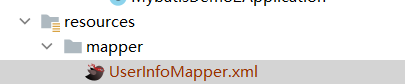
增删查改操作
增(Insert)
UserInfoMapper.xml
insert into user_info(username,password,age) values (#{username},#{password},#{age}) - <insert>的id必须与UserInfoXMLMapper中的insertUserInfo一致;
- parameType:入参类型(可省略),如果要写,要写全类名。
UserInfoXMLMapper接口
@Mapper
public interface UserInfoXMLMapper {Integer insertUserInfo(UserInfo userInfo);
}
测试
@SpringBootTest
class UserInfoXMLMapperTest {@Autowiredprivate UserInfoXMLMapper userInfoXMLMapper;@Testvoid insertUserInfo() {UserInfo userInfo=new UserInfo();userInfo.setUsername("张三");userInfo.setPassword("123");userInfo.setAge(13);System.out.println(userInfoXMLMapper.insertUserInfo(userInfo));}
}
结果

添加自增主键
insert into user_info(username,password,age) values (#{username},#{password},#{age}) 删除(delete)
UserInfoMapper.xml
delete from user_info where username=(#{username}) UserInfoXMLMapper接口
Integer deleteUser(UserInfo userInfo);测试
@Testvoid deleteUser() {UserInfo userInfo=new UserInfo();userInfo.setUsername("张三");userInfoXMLMapper.deleteUser(userInfo);}结果

查(select)
UserInfoMapper.xml
- resultType:返回值类型,如果缺少,那么参数占位符写法不规范。
UserInfoXMLMapper接口
UserInfo selectUserById(Integer id);测试
@Testvoid selectUserById() {userInfoXMLMapper.selectUserById(1);}结果

改(update)
UserInfoMapper.xml
Integer updateUser(String username,Integer id);UserInfoXMLMapper接口
update user_info set username=#{username} where id=#{id} 测试
@Testvoid updateUser() {userInfoXMLMapper.updateUser("lisi",2);}结果