

借助Aspose.Email,在 Python中创建事件日历

 Aspose.Email for Python via .NET是一款款 Outlook SDK ,是快速、安全且开发人员友好的自动日历安排解决方案。借助它,您以编程方式创建会议/活动。在本指南中,我们将演示如何借助Aspose.Email使用 Python 创建。
在职场生活中,创建和共享活动日程表是一项例行公事。为了提高效率,您需要自动为 Outlook 创建ICS文件。要实现这种自动化,您可以依赖Aspose.Email for Python via .NET。这款 Outlook SDK 是一款快速、安全且开发人员友好的自动日历安排解决方案。此外,它还允许您以编程方式创建会议/活动,这些会议/活动可以在几乎所有流行的电子邮件客户端(例如Microsoft Outlook、Google 日历或Apple 日历)中打开。在本指南中,我们将演示如何借助Aspose.Email使用 Python 创建事件日历。
Aspose.Email 正版试用下载,请联系Aspose官方授权代理商慧都科技
加入Aspose技术交流QQ群(1041253375),与更多小伙伴一起探讨提升开发技能。
通过 .NET 安装 Aspose.Email for Python - Outlook SDK 安装
安装此 SDK 非常简单。您联系Aspose官方授权代理商慧都科技下载SDK 文件,或在终端/CMD 中运行以下 pip 命令:
pip install Aspose.Email-for-Python-via-NET 使用 Python 创建事件日历 - 代码片段
本节将向您展示开发 ICS 文件创建器的实现。
请按照以下步骤操作:
- 创建AppointmentIcsSaveOptions类的实例来配置创建新日历事件的选项。
- 创建一个CalendarWriter将约会写入 ICS 文件。
- 实例化MailAddressCollection类的对象以创建与会者集合(如果需要,您可以添加更多)。
- 循环创建并写入 10 个日历约会。
- 通过初始化Appointment类的实例来创建新的约会。
- 设置预约描述(正文)。
- 设置预约摘要(标题/主题)。
- 调用write方法将约会写入 ICS 文件。
这是用 Python 创建事件日历的代码片段:
import aspose.email as ae
from aspose.email import MailAddress, MailAddressCollection
from aspose.email.calendar import (CalendarWriter,AppointmentIcsSaveOptions,AppointmentAction,Appointment
)
import datetime as dt# Set the directory where the ICS file will be saved.
dataDir = "files"
# Apply Aspose.Email license
license = ae.License()
license.set_license("License.lic")
# Create an instance of the AppointmentIcsSaveOptions class to configure options to create new calendar events.
saveOptions = AppointmentIcsSaveOptions()
saveOptions.action = AppointmentAction.CREATE
# Create a CalendarWriter to write appointments to an ICS file.
writer = CalendarWriter(dataDir + "WriteMultipleEventsToICS_out.ics", saveOptions)
# Instantiate an object of the MailAddressCollection class to create a collection of attendees (you can add more if needed).
attendees = MailAddressCollection()
attendees.append(MailAddress("attendee@domain.com"))
# Loop to create and write 10 calendar appointments.
for i in range(10):# Create a new appointment by initializing an instance of the Appointment class. appointment = Appointment(location="Room 112",start_date=dt.datetime(2018, 5, 27, 22, 12, 11),  # Start date & timeend_date=dt.date(2018, 5, 28),                    # End dateorganizer=MailAddress("from@domain.com"),attendees=attendees)# Set the appointment description (body).appointment.description = f"""\This is a test meeting body for appointment number {i}.Please review the following details:- Location: Room 112- Start Time: May 27, 2018 22:12- End Date: May 28, 2018- Organizer: from@domain.com- Attendee: attendee@domain.comLet us know if you have any questions.Regards,Test Scheduler Bot"""# Set the appointment summary (title/subject).appointment.summary = f"Test summary: Meeting {i}"# Call the write method to write the appointment to the ICS file.writer.write(appointment)
输出:
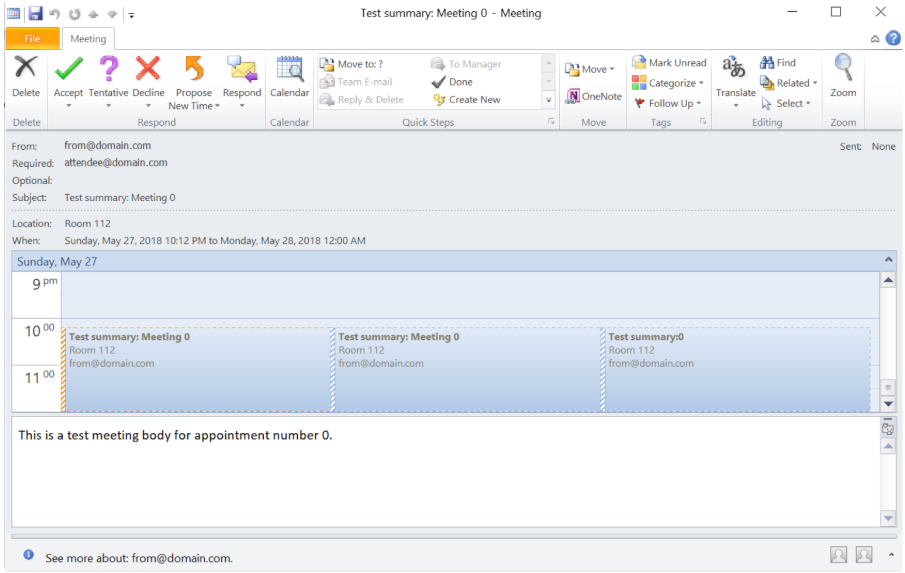
总之,Outlook 日历自动化如今已不再是一项艰巨的任务。Aspose.Email for Python 通过 .NET 为日历自动化带来了卓越的效率和稳健性。此 Outlook SDK 可让您无缝创建多个日历条目。
常见问题解答
问:如何在 Python 中创建事件日历?
答:您可以通过 .NET 使用 Aspose.Email for Python在 Python 中创建事件日历。只需创建Appointment对象,设置其详细信息(日期、时间、参与者),然后使用CalendarWriter保存即可。
问:什么是日历约会?
答:日历约会是指安排好的事件,其中包含日期、时间、地点和参与者等详细信息。它有助于组织会议或活动,并可在 Outlook 或 Google 日历等数字日历之间共享。
Aspose.Email 正版试用下载,请联系Aspose官方授权代理商慧都科技
加入Aspose技术交流QQ群(1041253375),与更多小伙伴一起探讨提升开发技能。
相关新闻

C++ map 和unordered_map 的区别

Kubernetes Cilium网络组件和CoreDNS配置
![题解:P10107 [GDKOI2023 提高组] 树](http://pic.xiahunao.cn/yaotu/题解:P10107 [GDKOI2023 提高组] 树)
题解:P10107 [GDKOI2023 提高组] 树

K8s资源调度与HPA自动扩缩容!AI流量波峰波谷自动适配,实现Agent服务智能弹性伸缩、降本增效

消费级外骨骼三条技术路线:适老、户外与轻量化如何选择?

2026年多功能万年历应用推荐:黄历道历佛历、亲友提醒和个人历怎么选?附天乙日历App完整测评

2026年,西宁地区如何选择可靠的竹床漏粪板合作品牌? - 装修教育财税推荐2026

2026 年 7 月新发布:英吉沙优秀的玻璃钢化工管道供应厂家哪个好,化工厂里藏着的这款耐腐“黑马”,居然能省出百万运维成本? - 行业推荐官【官方】
上是同源同构、哲学一致、逻辑相同,只是 MetaERP 把 EBS 的 “弹性域 + 多账簿” 做了云原生与元数据化升级,叫法更现代、)
MetaERP 与 Oracle EBS 在 COA(会计科目段)上是同源同构、哲学一致、逻辑相同,只是 MetaERP 把 EBS 的 “弹性域 + 多账簿” 做了云原生与元数据化升级,叫法更现代、

技术焦虑下的业务聚焦:构建可持续的技术竞争力
,免费生成专属「提分热力图」与瓶颈突破路线图)
仅限本周开放|GMAT AI备考效能评估工具(含ETS官方题库行为轨迹比对模块),免费生成专属「提分热力图」与瓶颈突破路线图

AI时代SEO新标配:Schema结构化数据与llms.txt实战指南

I.Ming 8.10字体发布:300+字符扩展与多语言排版技术架构深度解析

炉石传说增强插件HsMod:终极游戏加速与个性化定制指南

跨平台AI自动化测试实战指南:如何用智能视觉技术解决多端UI测试难题
![[C++]内存管理:串顺序存储的内存回收](http://pic.xiahunao.cn/yaotu/[C++]内存管理:串顺序存储的内存回收)
[C++]内存管理:串顺序存储的内存回收
:ArkUI 首页仪表盘搭建)
足球口袋教练 HarmonyOS 离线应用实战(03/20):ArkUI 首页仪表盘搭建
