拓冰网站定制
WCF双工通讯只要是通过调用由客户端实现的接口ICallback, 来实现服务端调用该接口方法来实现回调,从而把相关数据或对象传递到客户端的一种实现方式。当然目前通过WebSocket 也可以很容易实现,这里暂不讨论其他方法,只对WCF方法做一个简单的记录,以备忘记。
-
服务端
服务端接口(契约)
using System.ServiceModel;[ServiceContract(CallbackContract =typeof(IClientCallback))]public interface IMyService{[OperationContract(IsOneWay = true)]void RegisterClient();[OperationContract]void SendMessage(string message);}
回调接口(该接口在服务端不实现,由客户端实现)
[ServiceContract]public interface IClientCallback{[OperationContract(IsOneWay = true)]void NotifyClient(string message);[OperationContract(IsOneWay = true)]void ServerTimeUpdate(DateTime time);}
服务端实现接口类(即提供相关服务)
//服务实现[ServiceBehavior(InstanceContextMode=InstanceContextMode.PerSession)]public class MyService : IMyService{private IClientCallback callback;private Timer timer;public MyService() { //获取客户端回调通道callback=OperationContext.Current.GetCallbackChannel<IClientCallback>();}public void RegisterClient(){Console.WriteLine("客户端已连接");//设置定时器,定期向客户端发送服务器时间timer = new Timer(1000);timer.Elapsed += (s, e) => {try{callback.ServerTimeUpdate(DateTime.Now);} catch(Exception ex) {Console.WriteLine(ex.ToString());}};timer.Start();}public void SendMessage(string message){Console.WriteLine($"收到客户端消息:{message}");//向客户端发送响应callback.ServerTimeUpdate(DateTime.Now);}}
服务端启动WCF方法
internal class Program{static void Main(string[] args){using (ServiceHost host = new ServiceHost(typeof(MyService))){try {host.Open();Console.WriteLine("双工服务已启动!");foreach (var ep in host.Description.Endpoints){Console.WriteLine(ep.ListenUri);}}catch(Exception ex) {Console.WriteLine(ex.Message);}Console.ReadKey();}}}
服务端配置文件
<system.serviceModel><services><service name="DuplexService.Services.MyService"><endpoint address="" binding="wsDualHttpBinding" contract="DuplexService.Services.IMyService" /><endpoint address="" binding ="netTcpBinding" contract="DuplexService.Services.IMyService" /><host><baseAddresses><add baseAddress="http://localhost:10020/MyService"/><add baseAddress="net.tcp://localhost:10021/MyService" /></baseAddresses></host></service></services><behaviors><serviceBehaviors><behavior><serviceMetadata httpGetEnabled="true" httpsGetEnabled="true"/></behavior></serviceBehaviors></behaviors>
</system.serviceModel>
客户端
客户端对回调接口的实现
public class ClientCallback : IMyServiceCallback{/// <summary>/// 服务端通过回调接口来对客户端实例方法进行回调,给客户端传递消息/// </summary>/// <param name="message"></param>/// <exception cref="NotImplementedException"></exception>public void NotifyClient(string message){Console.WriteLine($"收到服务端发送的消息:{message}");}/// <summary>/// 服务端通过回调接口来对客户端实例方法进行回调,给客户端传递时间/// </summary>/// <param name="time"></param>/// <exception cref="NotImplementedException"></exception>public void ServerTimeUpdate(DateTime time){Console.WriteLine($"收到服务端回发的更新时间:{time.ToString("YYYY-MM-dd hh:mm:ss")}");}}
客户端实现双通道调用
internal class Program{static void Main(string[] args){//创建回调实例和实例上下文ClientCallback callback= new ClientCallback();InstanceContext context = new InstanceContext(callback);//创建双通道工厂(提供创建和管理不同类型的双工通道的方式,客户端使用这些通道在服务终结点发送和接收消息)DuplexChannelFactory<IMyService> fact = new DuplexChannelFactory<IMyService>(context,new NetTcpBinding(),new EndpointAddress("net.tcp://localhost:10021/MyService"));//创建到指定终结点指定类型的通道IMyService channel = fact.CreateChannel();try {//注册客户端channel.RegisterClient();Console.WriteLine("已连接到服务器,输入消息发送给服务器");string input;while ((input = Console.ReadLine()) != "exit"){channel.SendMessage(input);}channel.SendMessage("客户端退出");}catch (Exception ex){Console.WriteLine($"发生错误:{ex.Message}");//使通讯对象从其当前状态转换到关闭状态channel.Stop();fact.Close();}}}
客户端配置文件
<system.serviceModel><bindings><netTcpBinding><binding name="NetTcpBinding_IMyService"><security><transport sslProtocols="None" /></security></binding></netTcpBinding><wsDualHttpBinding><binding name="WSDualHttpBinding_IMyService" /></wsDualHttpBinding></bindings><client><endpoint address="http://localhost:10020/MyService" binding="wsDualHttpBinding"bindingConfiguration="WSDualHttpBinding_IMyService" contract="ServiceReference1.IMyService"name="WSDualHttpBinding_IMyService"><identity><userPrincipalName value="DESKTOP-H27UFUR\Administrator" /></identity></endpoint><endpoint address="net.tcp://localhost:10021/MyService" binding="netTcpBinding"bindingConfiguration="NetTcpBinding_IMyService" contract="ServiceReference1.IMyService"name="NetTcpBinding_IMyService"><identity><userPrincipalName value="DESKTOP-H27UFUR\Administrator" /></identity></endpoint></client></system.serviceModel>
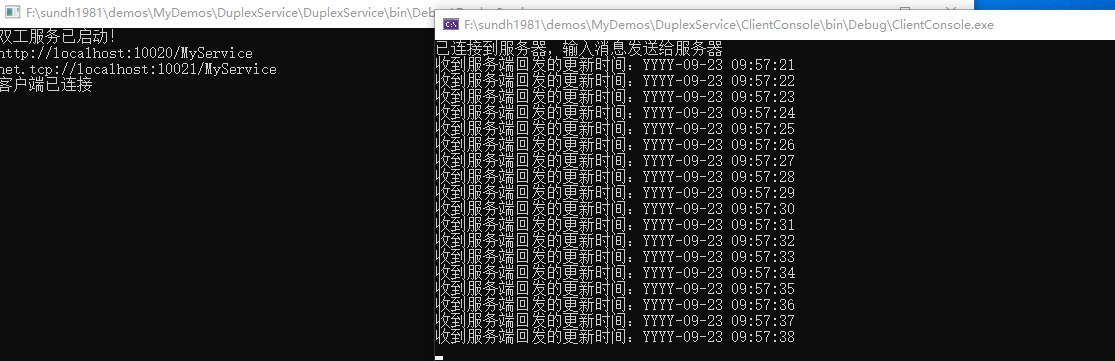
效果
-
服务端

-
客户端